Въведение
This manual provides essential information for setting up, operating, and maintaining your TCL 32S5K 32-inch QLED Smart TV. Please read these instructions carefully before using your television to ensure proper functionality and safety. Keep this manual for future reference.

Отпред view of the TCL 32S5K 32-inch QLED Smart TV. This image shows the television screen displaying vibrant colors, supported by two sleek stands.
Какво има в кутията
Проверете дали всички компоненти са налични в опаковката:
- TCL 32S5K Television
- Захранващ адаптер
- Захранващ кабел
- Дистанционно управление
- ТВ стойка (2 броя)
- Ръководство на потребителя (този документ)
Настройка
1. Монтиране на стойката за телевизор
- Внимателно поставете телевизора с екрана надолу върху мека, равна повърхност, за да предотвратите повреда.
- Подравнете всяка стойка със съответните слотове в долната част на телевизора.
- Закрепете стойките с предоставените винтове. Уверете се, че са здраво закрепени.

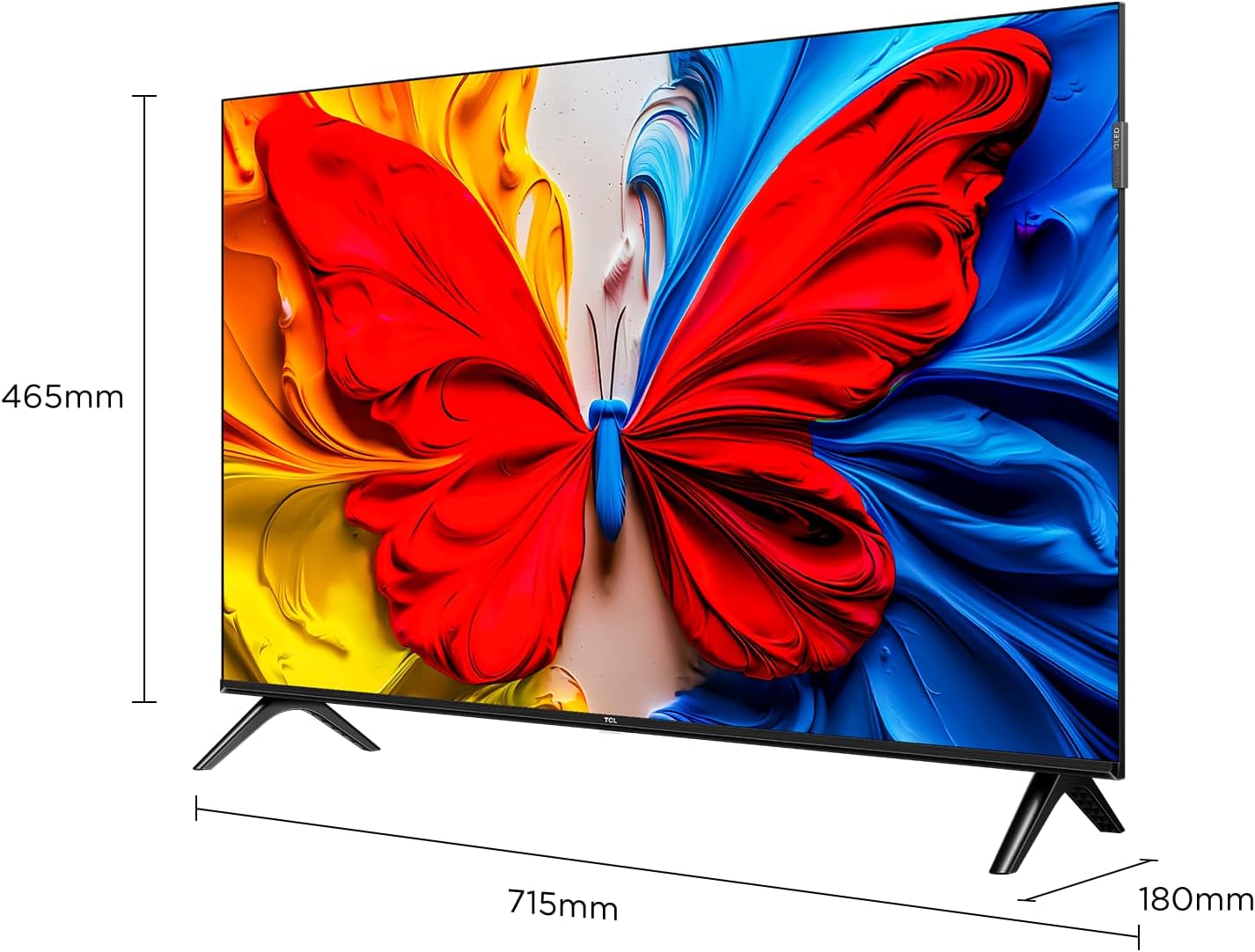
Image illustrating the dimensions of the TCL 32S5K TV and how the stands are attached to the bottom of the unit. The image shows measurements for width (715mm) and height (465mm).
2. Монтаж на стена (по избор)
If you choose to wall mount your TV, refer to the instructions provided with your wall mount kit. Ensure the wall mount is compatible with the VESA mounting pattern of the TCL 32S5K TV. Professional installation is recommended for wall mounting.
Задна view of the TCL 32S5K TV, showing the VESA mounting points and various input ports. This view is useful for understanding wall mount compatibility and cable management.
3. Свързване на външни устройства
Телевизорът разполага с множество портове за свързване на външни устройства:
- HDMI портове: Connect Blu-ray players, game consoles, cable/satellite boxes, etc. (Total 2 HDMI ports).
- USB портове: Свържете USB устройства за възпроизвеждане на мултимедия.
- Wi-Fi: Свържете се с домашната си мрежа за достъп до интернет и стрийминг.
- Bluetooth: Connect compatible wireless accessories.

отстрани view of the TCL 32S5K TV, highlighting the accessible input ports including HDMI and USB. This image helps users locate the connectivity options.
4. Захранване
Connect the power cable to the TV's power input, then plug the other end into a suitable electrical outlet.
5. Първоначална настройка
При първото включване, телевизорът ще ви преведе през процеса на първоначална настройка, включително:
- Избор на език.
- Мрежова връзка (Wi-Fi).
- Google Account sign-in (for Google TV features).
- Channel scanning (if connecting an antenna).
Инструкция за работа
Дистанционно управление
The included remote control allows you to navigate the TV's interface and control various functions. Insert two AAA batteries (not included) into the remote control, observing polarity.
- Бутон за захранване: Включва или изключва телевизора.
- Бутон за въвеждане: Selects input sources (HDMI 1, HDMI 2, USB, etc.).
- Бутони за навигация: Up, Down, Left, Right arrows to move through menus.
- Бутон OK: Потвърждава селекциите.
- Бутон за връщане назад: Връща се към предишния екран.
- Бутон за начало: Достъпва началния екран на Google TV.
- Бутони за сила на звука: Регулира силата на звука.
- Бутони за канали: Changes TV channels (if applicable).
- Бутон на Google Асистент: Активира гласовото управление.
Интерфейс на Google TV
Your TCL 32S5K TV runs on the Google TV operating system, providing access to a wide range of streaming apps, movies, and shows. Navigate using the remote control to browse content, search, and manage settings.
- Начален екран: Displays personalized content recommendations, installed apps, and quick access to inputs.
- приложения: Изтегляйте и управлявайте приложения от Google Play Store.
- настройки: Access TV settings for picture, sound, network, system, and more.
Ключови характеристики
QLED Display Technology
The TCL 32S5K features QLED (Quantum Dot LED) technology, which enhances color volume and accuracy, delivering a more vibrant and lifelike viewing experience compared to conventional LED TVs.

Diagram explaining the difference between Colorful Quantum Crystal (TCL QLED) and Conventional Quantum Crystal, highlighting the layers and efficiency.
HDR 10 Support
With HDR 10 support, the TV can display a wider range of brightness and contrast, revealing more detail in both the darkest and brightest areas of the picture. This results in a more dynamic and immersive visual experience.

Comparison image showing a scene with HDR (left) and without HDR (right), demonstrating the enhanced detail and dynamic range provided by HDR 10.
Dolby Audio
Experience rich, clear, and powerful sound with Dolby Audio. This technology optimizes the TV's audio output for an immersive listening experience, whether you're watching movies, sports, or playing games.

Image depicting a TV screen displaying a dynamic ocean wave, with visual elements suggesting enhanced audio quality, representing Dolby Audio.
Режим на игра
Game Mode automatically optimizes display settings for gaming, reducing input lag and improving responsiveness. This provides a smoother and more enjoyable gaming experience.

Split-screen image comparing "Game Mode Off" (left) and "Game Mode On" (right) during a video game scene, illustrating the visual improvements and reduced lag.
Тънък дизайн
The TCL 32S5K features a modern, slim design with a metallic bezel-less display, allowing the screen to blend seamlessly into your living space and providing a more immersive viewопит.

Показване на изображениетоasing тънкият професионалистfile and metallic bezel-less design of the TCL 32S5K TV, emphasizing its modern aesthetic.
Поддръжка
- Почистване на екрана: Внимателно избършете екрана с мека кърпа без власинки. За упорити петна използвайте почистващ препарат за екрани, специално предназначен за телевизори, нанесен върху кърпата, а не директно върху екрана.
- Почистване на шкафа: Използвайте мека, суха кърпа, за да избършете корпуса на телевизора. Избягвайте използването на абразивни почистващи препарати или разтворители.
- Вентилация: Уверете се, че вентилационните отвори на телевизора не са блокирани, за да предотвратите прегряване.
- Захранващ кабел: Regularly check the power cord for any damage. If damaged, contact customer support for replacement.
Отстраняване на неизправности
Преди да се свържете с отдела за обслужване на клиенти, опитайте следните решения за често срещани проблеми:
| проблем | Възможно решение |
|---|---|
| Няма захранване / Телевизорът не се включва. |
|
| Няма картина, но има звук. |
|
| Няма звук, но има картина. |
|
| Дистанционното управление не работи. |
|
| TV turns on for a few seconds then shuts off. |
|
Спецификации
| Характеристика | детайл |
|---|---|
| Име на модела | 32S5K |
| Размер на екрана | 32 инча |
| Технология на дисплея | QLED |
| Резолюция | 1920 x 1080 (FHD) |
| Честота на опресняване | 60 Hz |
| Поддържан HDR формат | HDR10 |
| Аудио технология | Dolby Audio, DTS, Dolby Atmos |
| Операционна система | Google TV |
| Свързаност | Wi-Fi, Bluetooth, 2x HDMI, USB |
| Размери на продукта (Д x Ш x В) | 2.95" Д x 28.15" Ш x 16.61" В |
| Тегло на артикула | 4.42 килограма |
| Тип монтаж | Настолен монтаж, Стенен монтаж |
| Включени компоненти | Захранващ адаптер, захранващ кабел, дистанционно управление, стойка, ръководство за потребителя |
Гаранция и поддръжка
За информация относно гаранцията, моля, вижте гаранционната карта, включена в продукта, или посетете официалния уебсайт на TCL. website. For technical support or service inquiries, please contact TCL customer service through their official channels. Keep your purchase receipt as proof of purchase for warranty claims.
Можете да намерите повече информация и поддръжка на Магазин на TCL в Amazon.


