1. Въведение
This manual provides detailed instructions for the setup, operation, maintenance, and troubleshooting of your AOOSTAR WTR PRO Intel N150 NAS Mini PC. Please read this manual carefully before using the device to ensure optimal performance and longevity.
2. Продуктът свършиview
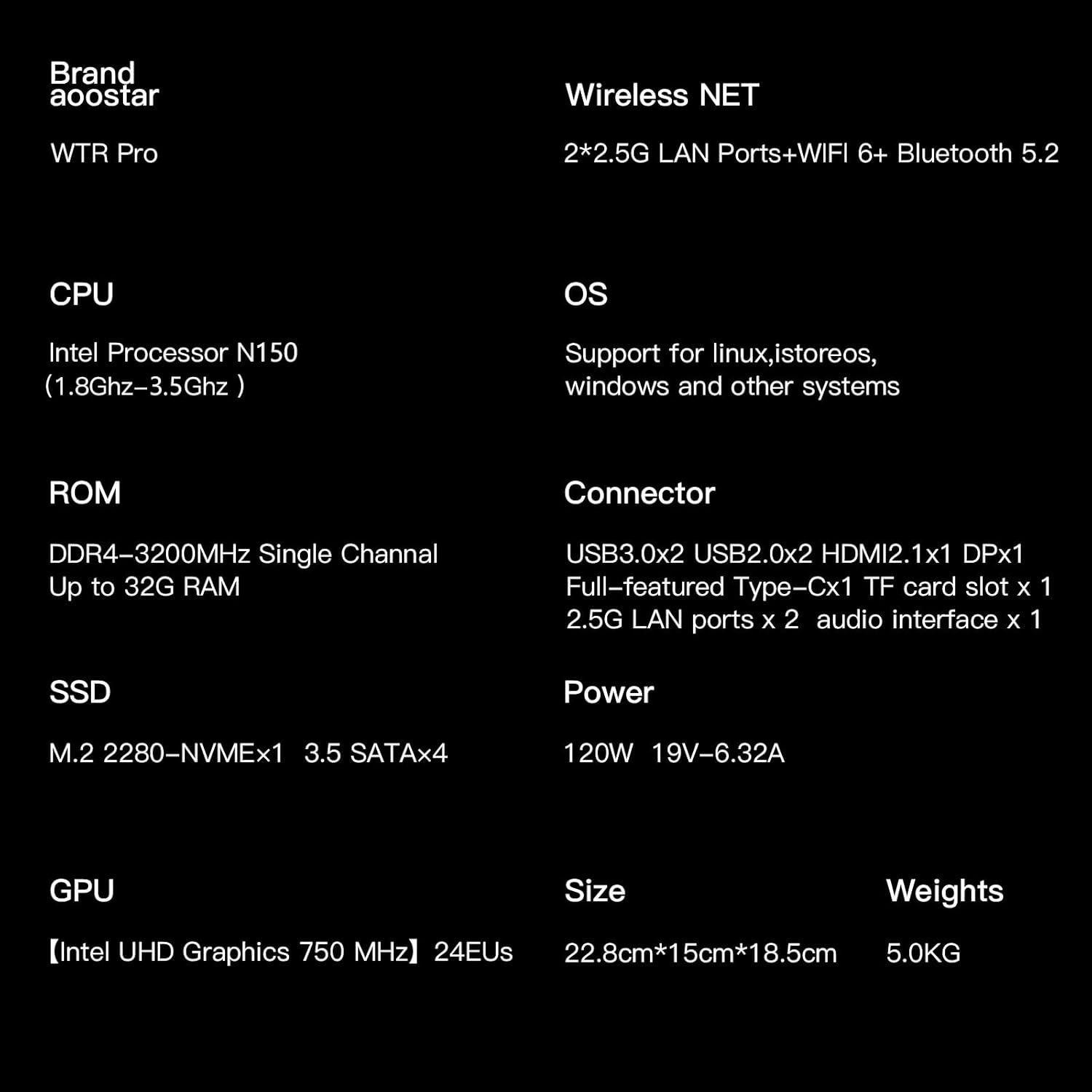
The AOOSTAR WTR PRO is a versatile NAS Mini PC featuring the 12th generation Intel Alder Lake-N150 processor. It is designed for various applications including network-attached storage, soft routing, and general computing tasks, offering robust performance and expandability.
Ключови характеристики:
- Процесор: Intel Alder Lake-N150 (4C/4T, up to 3.6 GHz)
- Памет: Dual-channel 3200MHz DDR4 RAM, 2 slots, supporting up to 64GB (32GB*2)
- Съхранение: 4 bays for 3.5-inch SATA hard drives (up to 4x 22TB), 2 M.2 2280-NVMe slots (up to 2TB)
- Графика: Intel UHD Graphics, supporting up to three 4K-resolution displays via DP1.4 (144Hz), HDMI 2.1, and Type-C.
- мрежа: 2 x 2.5G LAN ports
- Охлаждане: Through-the-wall construction with a 12CM ultra-quiet fan and intelligent fan control.
Портове и конектори:
The device offers a comprehensive set of ports for connectivity and expansion.

Изображение: Задна част view of the AOOSTAR WTR PRO N150 Mini PC, highlighting the various input/output ports.
- 2 x USB 3.0 порта
- 2 x USB 2.0 порта
- 1 x DP 1.4 port (4K@144Hz)
- 1 x HDMI 2.1 порт
- 1 x Type-C port
- 2 x LAN ports (2.5G)
- 1 х 3.5 мм аудио жак
- 1 x Micro SD Card Port
- 1 x DC вход за захранване
3. Настройка
3.1 Инсталиране на хардуер
Before powering on your device, you may need to install 3.5-inch SATA hard drives and M.2 NVMe SSDs for storage.
Installing 3.5-inch SATA Hard Drives:
- Gently open the front panel of the NAS Mini PC to reveal the drive bays.
- Slide each 3.5-inch SATA hard drive into an available bay until it clicks securely into place. No tools are required for this step.
- Затворете предния панел.

Image: Step-by-step installation of a 3.5-inch SATA hard drive into the AOOSTAR WTR PRO N150's drive bay.
Installing M.2 NVMe SSDs:
- Locate the M.2 NVMe slots, typically found on the underside or inside the chassis. Refer to the product diagram for exact location.
- Поставете M.2 NVMe SSD в слота под ъгъл.
- Внимателно натиснете надолу SSD устройството и го закрепете с предоставения винт или скоба за задържане.
Изображение: Вътрешно view of the AOOSTAR WTR PRO N150, illustrating the installation of M.2 NVMe SSDs.
3.2 Първоначално включване
- Connect the power adapter to the DC input port on the device and then to a power outlet.
- Connect a monitor to the HDMI, DP, or Type-C port.
- Свържете клавиатура и мишка към USB портовете.
- Натиснете бутона за захранване, за да включите устройството.
- Follow the on-screen instructions for initial operating system setup.
4. Инструкции за работа
4.1 Операционна система
The AOOSTAR WTR PRO N150 supports various operating systems, including Linux, Windows, and other compatible systems, allowing for flexible deployment based on your needs.
4.2 Конфигурация на мрежата
Utilize the dual 2.5G LAN ports for high-speed network connectivity. Connect the device to your router or network switch using Ethernet cables. Network settings can be configured within your chosen operating system.
4.3 Управление на съхранението
With 4 bays for 3.5-inch SATA HDDs and 2 M.2 NVMe slots, the WTR PRO offers extensive storage options. You can configure RAID arrays (e.g., RAID 0, 1, 5, 10) for data redundancy and performance, depending on your operating system and software. The device supports up to 4x 22TB 3.5-inch HDDs and up to 2TB M.2 NVMe SSDs.
4.4 4K Video Output and Multi-Screen Setup
The Mini PC supports simultaneous connection to up to three 4K-resolution displays via its DP1.4, HDMI 2.1, and Type-C ports. This enables efficient multitasking and an enhanced visual experience for office work, media consumption, or video editing.

Изображение: Надview of the AOOSTAR WTR PRO N150 Mini PC's core features, including its Intel N150 CPU, 4-bay design, memory, storage, and triple 4K display support.
5. Поддръжка
5.1 Охлаждаща система
The WTR PRO Mini PC features a through-the-wall construction and a 12CM fan for efficient heat dissipation. The intelligent fan control adjusts fan speed according to the system load, ensuring optimal cooling while maintaining quiet operation. The dustproof design helps prevent dust accumulation, contributing to stable long-term performance.

Image: Internal structure of the AOOSTAR WTR PRO N150, illustrating the cooling fan and airflow path for effective heat management.
5.2 Софтуерни актуализации
Regularly update your operating system and installed software to ensure security and access to the latest features and performance improvements.
6. Отстраняване на проблеми
If you encounter any issues with your AOOSTAR WTR PRO N150, please refer to the following general troubleshooting steps:
- Без захранване: Уверете се, че захранващият адаптер е здраво свързан както към устройството, така и към работещ електрически контакт.
- Без дисплей: Verify that the monitor cable is correctly connected to the device and the monitor. Try different display ports or cables.
- Мрежови проблеми: Check Ethernet cable connections. Verify network settings in your operating system.
- Storage Not Detected: Ensure hard drives and SSDs are properly seated in their bays/slots. Check drive health in your operating system's disk management tools.
For persistent issues or advanced support, please contact AOOSTAR customer service.
7. Спецификации
| Характеристика | Спецификация |
|---|---|
| Марка | AOOSTAR |
| Номер на модела на артикул | WTR PRO N150 |
| Процесор | Intel Alder Lake-N150 (3.6 GHz) |
| Графичен копроцесор | Графика Intel UHD |
| Скорост на паметта | 3200 MHz DDR4 SDRAM |
| Размер на флаш паметта | 16 GB (RAM) |
| Капацитет за съхранение на паметта | 512 GB (SSD) |
| Поддръжка на твърди дискове | 4x 22TB HDD (Serial ATA) |
| Максимална разделителна способност на екрана | 3840x2160 (4K) |
| Технология за свързване | DP1.4, HDMI, LAN, USB |
| Общо USB портове | 4 (2x USB 3.0, 2x USB 2.0) |
| Размери на продукта (ДxШxВ) | 8.6 x 5.9 x 7 инча |
| Тегло на артикула | 11 паунда |
8. Гаранция и поддръжка
AOOSTAR provides 12 months of after-sales service from the date of order. If you have any questions or require support for your product, please use the following methods:
- Amazon Inquiry: Log in to your Amazon account, check your order, and click "Get Help" to request support.
- Поддръжка по имейл: Изпратете вашите въпроси на aoostar-shop@outlook.com.
9. Видео за продукта
Гледайте това официално видео за продукта за визуална представаview of the AOOSTAR WTR PRO Intel N150 Mini PC.
Видео: Официално видео представяне на продуктаasing the AOOSTAR WTR PRO Intel N150 Mini PC.


