1. Въведение
This manual provides detailed instructions for the setup, operation, and maintenance of your MOBAPAD Huben2 Wireless Switch Controller Pro. Please read this manual thoroughly before using the product to ensure optimal performance and longevity.
2. Информация за безопасност
- Дръжте контролера далеч от вода и други течности.
- Не излагайте контролера на екстремни температури.
- Избягвайте изпускане или подлагане на контролера на силни удари.
- Do not attempt to disassemble or repair the controller yourself. Contact customer support for assistance.
- Използвайте само предоставения кабел за зареждане или сертифициран USB-C кабел за зареждане.
3. Съдържание на пакета
Проверете дали всички артикули са налични във вашия пакет:
- MOBAPAD Huben2 Wireless Controller Pro
- USB-C кабел за зареждане
- Wireless Dongle (2.4G)
- PU Travel Case
- Replaceable D-pad (Cross/Circle)
- Ръководство за употреба (този документ)
4. Разположение на контролера
Familiarize yourself with the buttons and features of your Huben2 controller.

Фигура 4.1: Отпред view of the MOBAPAD Huben2 Wireless Controller Pro. Shows the joysticks, face buttons (A, B, X, Y), D-pad, and central function buttons.
- Ляв/десен аналогов стик: Capacitive joysticks with 4,096-step precision.
- Бутони A/B/X/Y: Omron mechanical face buttons.
- D подложка: Replaceable cross or circle D-pad.
- L1/R1 (Раменни бутони): Standard shoulder buttons.
- L2/R2 (Тригери): Dual-mode triggers (Hall Effect and Microswitch).
- M1/M2/M3/M4 Buttons: Four programmable back buttons.
- Бутон за начало: Powers on/off and returns to system home screen.
- Бутон за екранна снимка: Прави екранни снимки.
- Бутони Плюс/Минус: Standard system menu buttons.
- Турбо бутон: Activates/deactivates turbo function.
- USB-C порт: За зареждане и кабелна връзка.

Фигура 4.2: Задна част view showing the four programmable M1, M2, M3, M4 back buttons.
5. Настройка
5.1 Зареждане на контролера
Before first use, fully charge the controller. Connect the provided USB-C cable to the controller's USB-C port and the other end to a USB power source (e.g., console, PC, or USB wall adapter). The charging indicator will show the charging status.
- A full charge provides approximately 15 hours of gameplay.

Figure 5.1: The controller features a 1000mAh battery for extended gameplay.
5.2 Режими на свързване
The Huben2 controller supports three connection methods:

Figure 5.2: The controller supports 2.4G wireless, Bluetooth, and wired connections across various platforms.
- 2.4G Wireless (via Dongle):
- Compatible with Windows PC, Steam, and Android TV.
- Insert the 2.4G wireless dongle into a USB port on your device.
- Включете контролера. Той би трябвало автоматично да се свърже с донгъла.
- Безжичен Bluetooth:
- Compatible with Nintendo Switch, Nintendo Switch 2, Android, and iOS devices.
- На вашето устройство отидете в настройките на Bluetooth и активирайте Bluetooth.
- On the controller, press and hold the Bluetooth pairing button (refer to controller layout for exact location) until the indicator lights flash rapidly.
- Select "MOBAPAD Huben2" from the list of available devices on your system to pair.
- For Nintendo Switch, the controller can wake the console from sleep mode after initial pairing and firmware update via the Mobapad app.
- Кабелна връзка:
- Compatible with Windows PC and Android TV.
- Connect the controller to your device using the USB-C cable. The controller will be recognized automatically.
6. Инструкции за работа
6.1 Включване/изключване
- Включване: Натиснете бутона Начало.
- Изключване: Press and hold the Home button for 3-5 seconds. The controller will also power off automatically after a period of inactivity.
6.2 Dual Trigger Modes
The L2 and R2 triggers feature dual modes for different gaming experiences:

Figure 6.1: Visual representation of the 2mm Microswitch Trigger and 10mm Hall Linear Trigger modes.
- Microswitch Trigger (2mm): Provides a short, tactile click for rapid input, ideal for FPS games.
- Hall Effect Linear Trigger (10mm): Offers analog input with a longer travel distance, suitable for racing or simulation games.
- Режими на превключване: Use the physical switches located near the L2/R2 triggers to toggle between modes.
6.3 Customizable Features (Back Buttons, Macros, App Support)
The Huben2 controller offers extensive customization options:
- Programmable Back Buttons (M1-M4): Assign single button presses or complex macros to the four back buttons using the dedicated Mobapad PC/mobile application.
- Rapid-Fire Turbo Mode: Activate turbo functionality for any button. Refer to the Mobapad app or controller manual for specific button combinations to enable/disable.
- Mobapad App: Download the official Mobapad application for Windows or mobile devices to:
- Adjust joystick dead zones and response curves.
- Персонализирайте интензитета на вибрациите.
- Създавайте и управлявайте макроси.
- Update controller firmware.
6.4 HD Rumble and ALPS Linear Motors
The controller features dual ALPS linear motors for precise HD Rumble feedback, reacting to in-game sound and motion with 0ms startup time.
6.5 6-Axis Motion Control
The integrated 6-axis motion sensor provides precise motion control for compatible games.

Figure 6.2: The controller's internal 6-axis sensing motors enable precise motion control.
6.6 Replaceable D-pad and Faceplate
The controller allows for customization of the D-pad and faceplate.
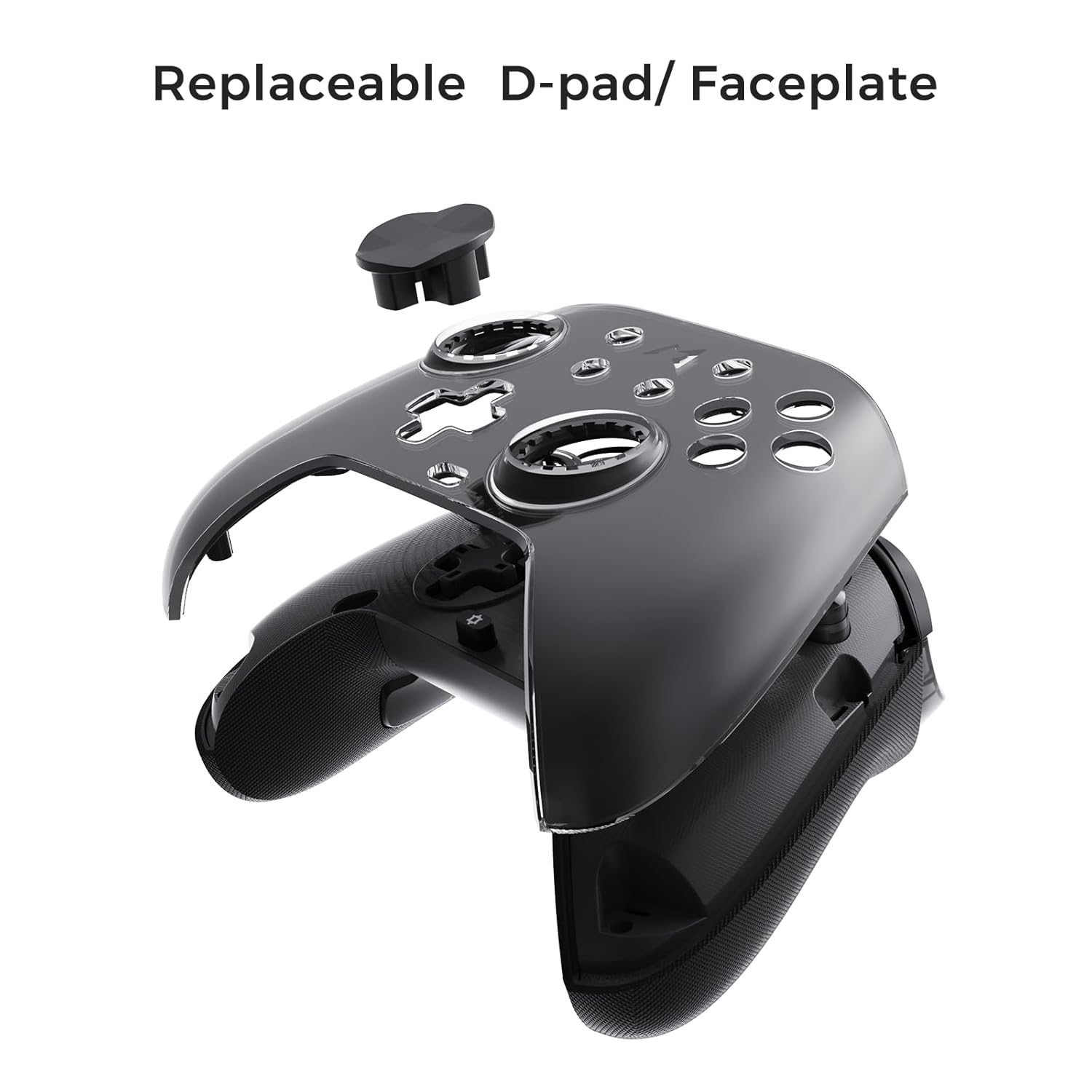
Figure 6.3: The D-pad and faceplate can be replaced for customization or preference.
- To replace the D-pad, gently remove the magnetic faceplate and then lift out the D-pad. Insert the desired D-pad (cross or circle) and reattach the faceplate.
7. Поддръжка
- Почистване: Използвайте мека, суха кърпа за почистване на контролера. За упорити замърсявания, леко намажетеampНамокрете кърпата с вода. Не използвайте агресивни химикали или абразивни почистващи препарати.
- Съхранение: Store the controller in a cool, dry place, away from direct sunlight and extreme temperatures. When not in use for extended periods, store it in the provided PU travel case.
- Грижа за батерията: За да удължите живота на батерията, избягвайте честото пълно разреждане на контролера. Зареждайте го редовно, дори и да не го използвате постоянно.
8. Отстраняване на проблеми
| проблем | Възможна причина | Решение |
|---|---|---|
| Контролерът не се включва. | Ниска батерия. | Зареждайте контролера поне 30 минути. |
| Контролерът не се свързва безжично. | Not in pairing mode; out of range; interference; incorrect mode selected. | Ensure controller is in pairing mode. Move closer to the device. Check for other wireless devices causing interference. Verify correct connection mode (2.4G or Bluetooth). |
| Забавяне на входа или прекъсвания на връзката. | Wireless interference; low battery; outdated firmware. | Reduce distance to device. Charge controller. Update firmware via Mobapad app. Try wired connection. |
| Бутоните или джойстиците не реагират. | Software glitch; physical obstruction; calibration issue. | Restart the controller and the connected device. Check for physical debris. Calibrate joysticks via Mobapad app. |
| HD Rumble не работи. | Feature disabled in game/system settings; low battery. | Ensure rumble is enabled in game and system settings. Charge controller. |
If you encounter issues not listed here, please refer to the official MOBAPAD support webсайт или се свържете с отдела за обслужване на клиенти.
9. Спецификации
| Характеристика | детайл |
|---|---|
| Номер на модела | Mobapad Huben2 H6 |
| Свързаност | 2.4G безжична връзка, Bluetooth, кабелна (USB-C) |
| Съвместимост | Nintendo Switch, Nintendo Switch 2, Windows, Steam, Android, iOS |
| Джойстики | Capacitive, 4,096-step precision, 1000Hz polling rate |
| Тригери | Dual Mode: 2mm Omron Microswitch, 10mm Hall Effect Linear |
| Бутони | Omron Mechanical Face Buttons, Programmable Back Buttons (M1-M4) |
| Вибрация | Dual ALPS Linear Motors (HD Rumble) |
| Контрол на движението | 6-осен жироскоп |
| Капацитет на батерията | 1000mAh литиево-йонна |
| Живот на батерията | До 15 часа (приблизително) |
| Размери | 6.3 x 4.13 x 2.76 инча |
| Тегло | 1.87 паунда |
10. Гаранция и поддръжка
MOBAPAD products are designed and manufactured to the highest quality standards. For warranty information, technical support, or customer service inquiries, please visit the official MOBAPAD website or contact their authorized support channels. Please retain your proof of purchase for warranty claims.
Webсайт: Visit the MOBAPAD Store on Amazon


