1. Въведение
The Thunderobot L1 Computer Monitor Lamp is designed to provide optimal lighting for your workspace, focusing on eye comfort and visual clarity. It features an asymmetric light source, high color rendering (Ra≥95), flicker-free illumination, low blue light protection, and adjustable color temperature and brightness levels.
2. Информация за безопасност
- Уверете се, че lamp is securely placed on the monitor to prevent accidental falls.
- Не излагайте lamp към вода или прекомерна влага.
- Avoid disassembling the product. Contact support for repairs.
- Използвайте само предоставения USB кабел за захранване.
- Да се пази от деца.
3. Съдържание на пакета
Проверете дали всички елементи са налични в пакета:
- Thunderobot L1 Computer Monitor Lamp
- USB захранващ кабел
- Ръководство за потребителя
4. Инструкции за настройка
- Позициониране на Lamp: Gently place the Thunderobot L1 Monitor Lamp on top of your computer monitor. The gravity-activated clamping mechanism and silicone anti-slip stabilizers will help secure it in place. Adjust the lamp's angle using the dual-pivot adjustment system to direct light onto your workspace without screen glare.
- Свързваща мощност: Connect the provided USB cable to the USB-C port on the lamp and plug the other end into an available USB port on your computer or a USB power adapter (not included). The lamp ще се включи.

Image: The Thunderobot L1 lamp features a gravity-activated clamp, silicone stabilizers, and a dual-pivot adjustment system for secure and flexible positioning.
Video: This video demonstrates the assembly and installation of the Thunderobot L1 Computer Monitor Lamp, showing how to attach it to a monitor and connect the power cable.
5. Инструкции за работа
The Thunderobot L1 Monitor Lamp features intuitive touch controls located on the top surface of the lamp.
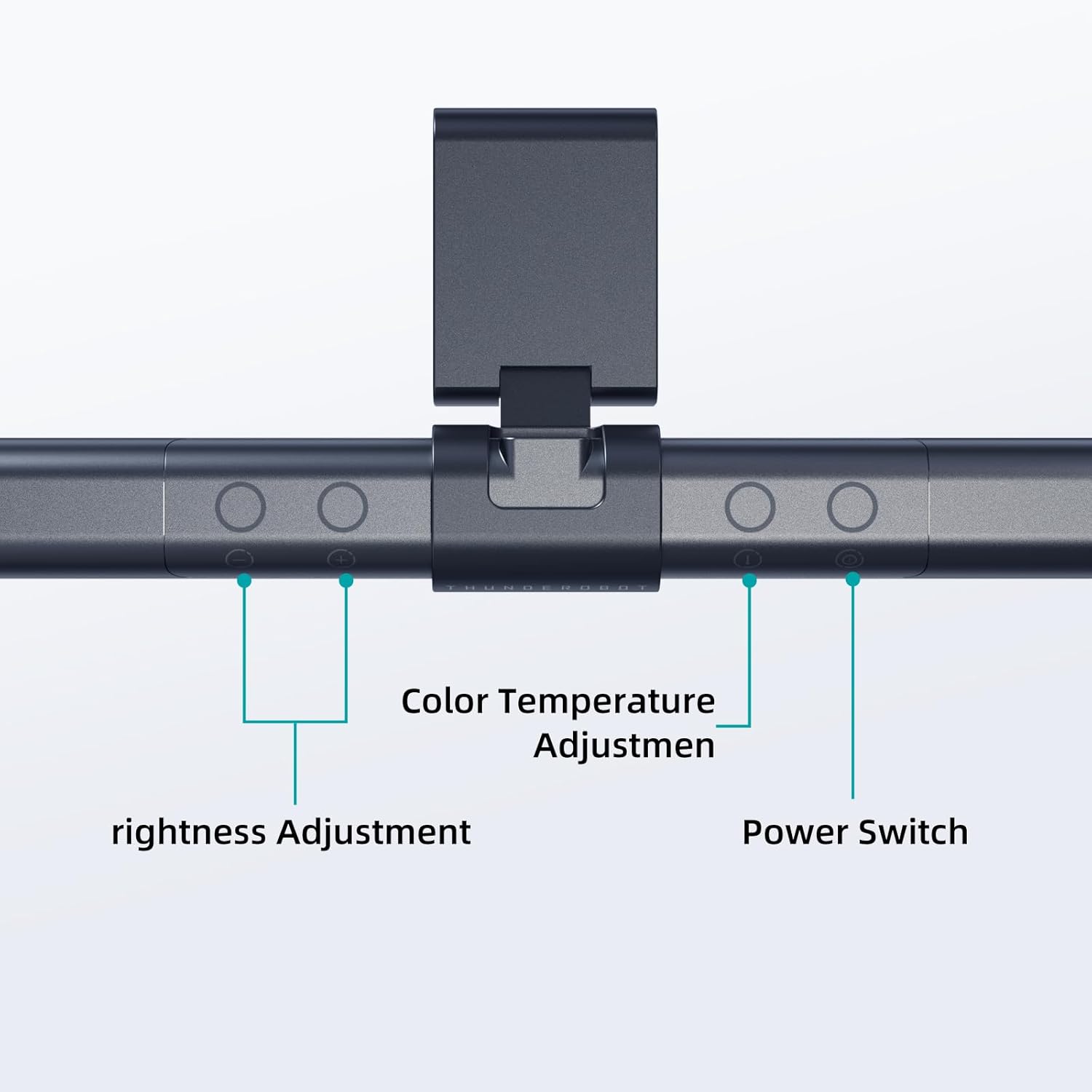
Image: The touch controls include buttons for brightness adjustment, color temperature adjustment, and power.
- Включване/изключване: Натиснете бутона за захранване (O), за да завъртите lamp включено или изключено.
- Регулиране на яркостта: Use the brightness adjustment buttons (+ и -) to cycle through ten levels of brightness.
- Регулиране на цветовата температура: Натиснете бутона за цветна температура (i) to switch between six different color temperature settings.

Изображение: Лamp offers six adjustable color temperatures, ranging from 3000K (Warm Light) to 6000K (Cool White Light), suitable for various activities like movie viewing, reading, studying, and working.
6. Ключови характеристики
- Asymmetric Light Source: The advanced asymmetric light design ensures uniform light distribution across the workspace, eliminating screen glare and shadows. This optimizes the light path for comfortable, prolonged use.
- Ra≥95 High Color Rendering: With a color rendering index of Ra≥95, the lamp accurately reproduces colors, providing a vivid and true-to-life visual experience for various tasks.
- Осветление без трептене: Equipped with flicker-free technology, this lamp provides constant, stable illumination, reducing eye strain and headaches associated with traditional lighting.
- Low Blue Light Protection: Advanced low blue light technology reduces harmful blue wavelengths, alleviating eye strain, dryness, and fatigue, especially during extended screen time.
- Six Color Temperatures: Offers a versatile range of six color temperature options, from warm white to cool white, allowing users to customize the lighting atmosphere for different scenarios and preferences.
- Ten-Level Dimming: Provides ten adjustable brightness levels for precise control over illumination intensity.

Image: The Ra≥95 High CRI ensures colors are displayed accurately and vibrantly, as demonstrated by the fruit comparison.

Изображение: Лamp provides low blue light protection, reducing harmful blue light exposure for eye comfort.
7. Спецификации
| Характеристика | детайл |
|---|---|
| Размери на продукта | 3.5" Д x 17.7" Ш x 3.85" В |
| Тегло на артикула | 16 унции |
| Lamp Тип | Бюро Lamp |
| Цвят на сенките | черен |
| Материал на сенника | Полиестер |
| Тип превключвател | Бутон |
| Технология за свързване | USB (за захранване) |
| Voltage | 12 волта |
| Цвят | черен |
| Форма | Плосък |
| Тип материал | Поликарбонат |
| Номер на модела | TH-L1-B2 |
8. Поддръжка
- Почистване: Изключете захранването преди почистване. Използвайте мека, суха кърпа, за да избършете lamp. Не използвайте абразивни почистващи препарати или разтворители.
- Съхранение: Когато не се използва за продължителни периоди, съхранявайтеamp на хладно и сухо място.
9. Отстраняване на проблеми
- Lamp не се включва:
- Уверете се, че USB кабелът е надеждно свързан към lamp и източника на захранване.
- Verify that the power source (USB port or adapter) is functional.
- Светлинни трептения:
- Проверете захранващата връзка.
- If flickering persists, contact customer support.
- Контролите не реагират:
- Disconnect and reconnect the power cable to reset the lamp.
- Уверете се, че пръстите ви са чисти и сухи, когато използвате сензорните контроли.
10. Гаранция и поддръжка
Thunderobot provides 1-year product quality support for the L1 Computer Monitor Lamp. For warranty claims or technical assistance, please contact Thunderobot customer service.


