1. Въведение
Благодаря за покупкатаasing the GOVO GOSURROUND 600 2.1 Channel Soundbar. This manual provides essential information for the safe and efficient use of your new audio system. Please read it thoroughly before operation and retain it for future reference.
Съдържание на пакета
Уверете се, че всички изброени по-долу елементи са налични във вашия пакет:
- 1 x GOVO GOSURROUND 600 Soundbar
- 1 x Субуфер
- 1 x Дистанционно управление
- 1 x Aux кабел
- 1 x Ръководство за потребителя
- 1 х Гаранционна карта
2. Информация за безопасност
За да осигурите безопасна работа и да предотвратите повреди, моля, спазвайте следните предпазни мерки:
- Не излагайте устройството на дъжд, влага или екстремни температури.
- Не отваряйте casinж. Възлагайте всички сервизни дейности на квалифициран персонал.
- Дръжте устройството далеч от пряка слънчева светлина, източници на топлина и силни магнитни полета.
- Осигурете правилна вентилация около саундбара и субуфера.
- Използвайте само захранващия адаптер, доставен с устройството.
- Изключвайте щепсела от контакта по време на гръмотевични бури или когато не го използвате за продължителни периоди.
3. Продуктът свършиview
The GOVO GOSURROUND 600 system consists of a soundbar and a wired subwoofer, designed to enhance your audio experience with 2.1 channel sound and deep bass.

Фигура 3.1: The GOVO GOSURROUND 600 Soundbar and its accompanying wired subwoofer.
Soundbar Controls and Indicators
The soundbar features integrated controls and indicators for easy access. Specific button functions are detailed in the Operating Instructions section.
Дистанционно управление
The included remote control provides full functionality for managing your soundbar settings, including power, volume, input selection, and equalizer modes.

Фигура 3.2: The remote control for the GOVO GOSURROUND 600 Soundbar, showing various function buttons.
4. Настройка
Follow these steps to set up your GOVO GOSURROUND 600 Soundbar system.
4.1 Поставяне
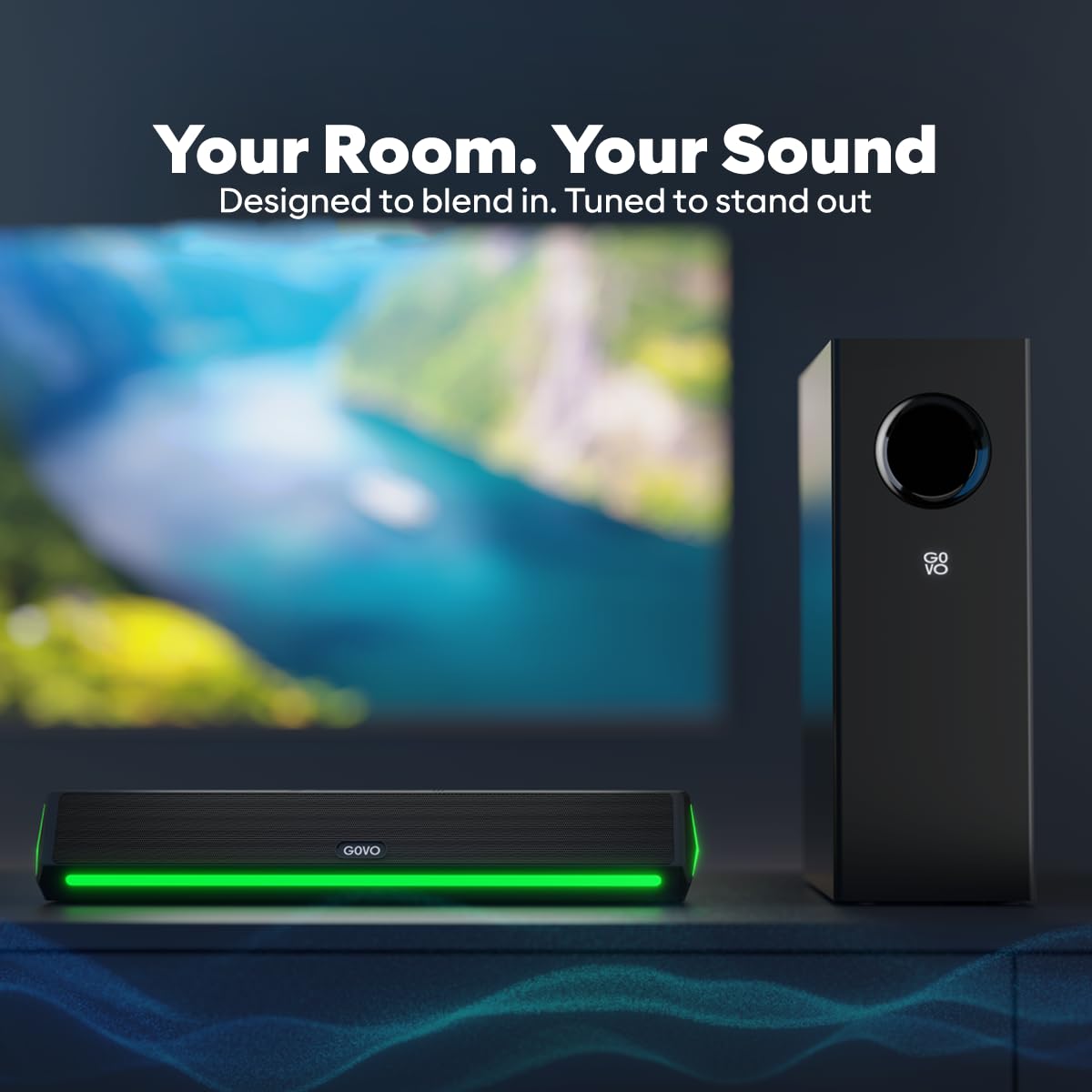
- Place the soundbar centrally below your television or display.
- Position the subwoofer on the floor near the soundbar, ensuring it has adequate space for sound dispersion.
Фигура 4.1: Recommended placement of the soundbar in front of a television and the subwoofer beside it.
4.2 Свързване на субуфера
The subwoofer connects to the soundbar via a wired connection. Locate the dedicated subwoofer output port on the soundbar and the input port on the subwoofer. Connect them securely using the provided cable.
4.3 Захранване
Connect the power adapter to the DC input port on the soundbar, then plug the adapter into a wall outlet. Ensure the power outlet is easily accessible.
Фигура 4.2: Rear panel of the soundbar showing the HDMI, AUX, USB, SUB (subwoofer output), and DC power input ports.
5. Инструкции за работа
This section details how to operate your GOVO GOSURROUND 600 Soundbar.
5.1 Включване/изключване
- За да включите, натиснете Мощност бутон на дистанционното управление или на саундбара.
- За да изключите, натиснете Мощност button again. The soundbar will enter standby mode.
5.2 Контрол на звука
- Натиснете VOL+ на дистанционното, за да увеличите звука.
- Натиснете ОБЕМ- на дистанционното, за да намалите звука.
- Натиснете Без звук бутон, за да изключите или включите звука.
5.3 Избор на входен източник
Натиснете ВХОД button on the remote control or the soundbar to cycle through available input sources: Bluetooth, HDMI (ARC), AUX, and USB.
5.4 Режими на еквалайзера (EQ)
The soundbar features 5 preset equalizer modes to optimize audio for different content types. Press the EQ button on the remote to switch between:
- Поп
- Рок
- Джаз
- Класически
- държава
5.5 Регулиране на баса и високите честоти
Използвайте БАС+ / БАС- и TRE+ / TRE- бутоните на дистанционното управление, за да настроите фино нивата на басите и високите честоти според вашите предпочитания.
6. Свързаност
The GOVO GOSURROUND 600 offers multiple connectivity options for various devices.
6.1 Bluetooth Pairing (BT v5.3)
- Power on the soundbar and select the Bluetooth input mode using the ВХОД button. The indicator light will flash, indicating pairing mode.
- On your mobile device, enable Bluetooth and search for "GOVO GOSURROUND 600" in the list of available devices.
- Select the soundbar to pair. Once connected, the indicator light will stop flashing and remain solid.
6.2 HDMI (ARC) връзка
For optimal audio quality and control, connect your TV to the soundbar using an HDMI cable (not included) via the HDMI (ARC) port.
- Connect one end of an HDMI cable to the HDMI (ARC) port on your TV.
- Connect the other end to the HDMI (ARC) port on the soundbar.
- Select HDMI input on the soundbar using the ВХОД бутон.
- Уверете се, че функцията HDMI ARC на вашия телевизор е активирана в аудио настройките му.
6.3 AUX връзка
Use the provided 3.5mm AUX cable to connect devices with an analog audio output.
- Connect one end of the AUX cable to the AUX port on the soundbar.
- Connect the other end to the headphone jack or audio output port of your device.
- Select AUX input on the soundbar using the ВХОД бутон.
6.4 Възпроизвеждане от USB
The soundbar supports audio playback from USB storage devices.
- Поставете USB устройство, съдържащо аудио files в USB порта на звуковата лента.
- Select USB input on the soundbar using the ВХОД бутон.
- Playback will begin automatically. Use the remote control to navigate tracks.
7. Поддръжка
Proper care ensures the longevity and performance of your soundbar system.
- Почистване: Използвайте мека, суха кърпа за почистване на повърхностите на саундбара и субуфера. Не използвайте течни почистващи препарати или абразивни материали.
- Съхранение: Ако съхранявате устройството за продължителен период от време, изключете го от захранването и го съхранявайте на хладно и сухо място.
- Вентилация: Ensure that the speaker grilles and vents are not obstructed to prevent overheating.
8. Отстраняване на проблеми
Вижте този раздел за решения на често срещани проблеми, с които може да се сблъскате.
| проблем | Възможна причина | Решение |
|---|---|---|
| Без захранване | Захранващият кабел не е свързан; Захранващият контакт не е активен | Проверете свързването на захранващия кабел; опитайте с друг контакт |
| Без звук | Incorrect input source; Volume too low; Mute activated; Cables not connected properly | Select correct input source; Increase volume; Deactivate mute; Reconnect audio cables securely |
| Bluetooth сдвояването не бе успешно | Саундбарът не е в режим на сдвояване; Устройството е твърде далеч; Смущения | Ensure soundbar is in BT mode and flashing; Move device closer; Turn off other Bluetooth devices |
| Дистанционното не работи | Изтощени батерии; Препятствие между дистанционното и саундбара | Replace remote batteries; Remove any obstructions; Ensure remote is pointed at the soundbar's sensor |
| Субуферът не възпроизвежда бас | Subwoofer cable loose; Bass level set too low | Check and secure the subwoofer connection cable; Increase bass level using the remote control |
9. Спецификации
Technical specifications for the GOVO GOSURROUND 600 Soundbar system.
| Име на модела | GoSurround 600 |
| Тип високоговорител | Саундбар със субуфер |
| Конфигурация на канала за съраунд звук | 2.1 |
| Максимална изходна мощност на високоговорителя | 90 вата |
| Диаметър на субуфера | 4 инча |
| Speaker Size (Soundbar) | 2 Inches (2 x 2" speakers) |
| Безжична комуникационна технология | Bluetooth v5.3 |
| Технология за свързване | Auxiliary, Bluetooth, HDMI (ARC), USB |
| EQ режими | Pop, Rock, Jazz, Classic, Country |
| Контролен метод | Дистанционно |
| Размери на продукта | 20D x 12W x 33.5H Centimeters (Note: These dimensions likely refer to the subwoofer or packaging, as the soundbar is typically longer.) |
| Тегло на артикула | 2.8 кг |
| Материал | Пластмаса |
| Източник на захранване | Електрически с кабел |
10. Гаранция и поддръжка
The GOVO GOSURROUND 600 Soundbar comes with a Ограничена гаранция. Please refer to the included Warranty Card for detailed terms and conditions, including the warranty period and coverage.
For technical assistance, troubleshooting beyond this manual, or warranty claims, please contact GOVO customer support. Contact information can typically be found on the warranty card or the official GOVO webсайт.
Моля, запазете касовата си бележка като доказателство за покупка за гаранционни услуги.


