1. Въведение
Thank you for choosing the Oakcastle IR200 Internet Radio. This manual provides essential information for the safe and efficient operation of your device. Please read it thoroughly before use and retain it for future reference.
The Oakcastle IR200 is a versatile audio system offering multiple listening options, including Internet Radio, DAB+, FM, Bluetooth 5.3, and AUX input. It features a color display, remote control, and podcast support for a comprehensive audio experience.
2. Съдържание на пакета
Внимателно разопаковайте кутията и се уверете, че всички изброени по-долу елементи са налични и в добро състояние:
- Oakcastle IR200 Internet Radio Unit
- Захранващ кабел
- Дистанционно управление
- Ръководство на потребителя (този документ)
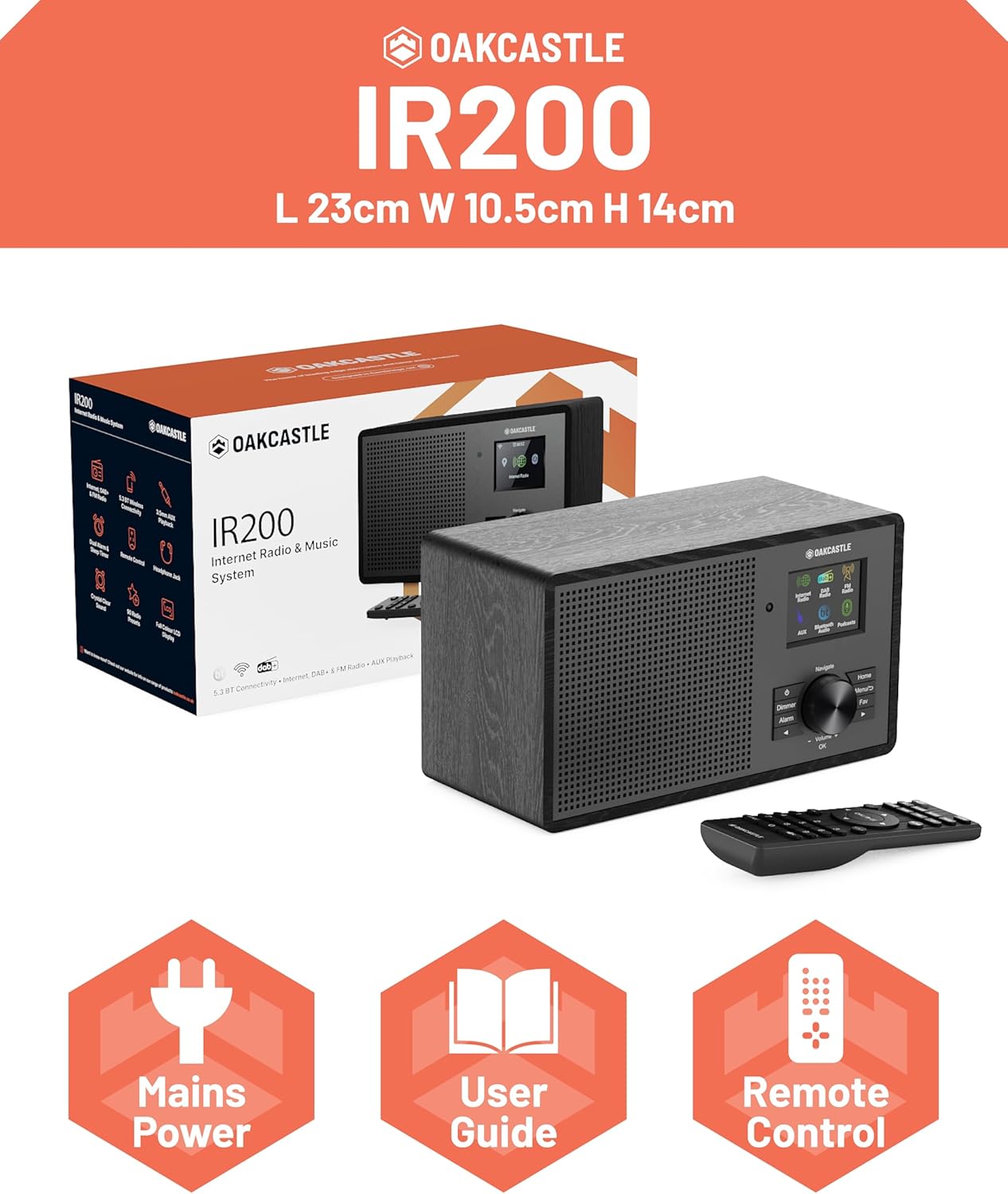
Image 2.1: Contents of the Oakcastle IR200 package, including the radio unit, its box, power cable, remote control, and user manual.
3. Продуктът свършиview
Familiarize yourself with the main components and controls of your Oakcastle IR200 radio.
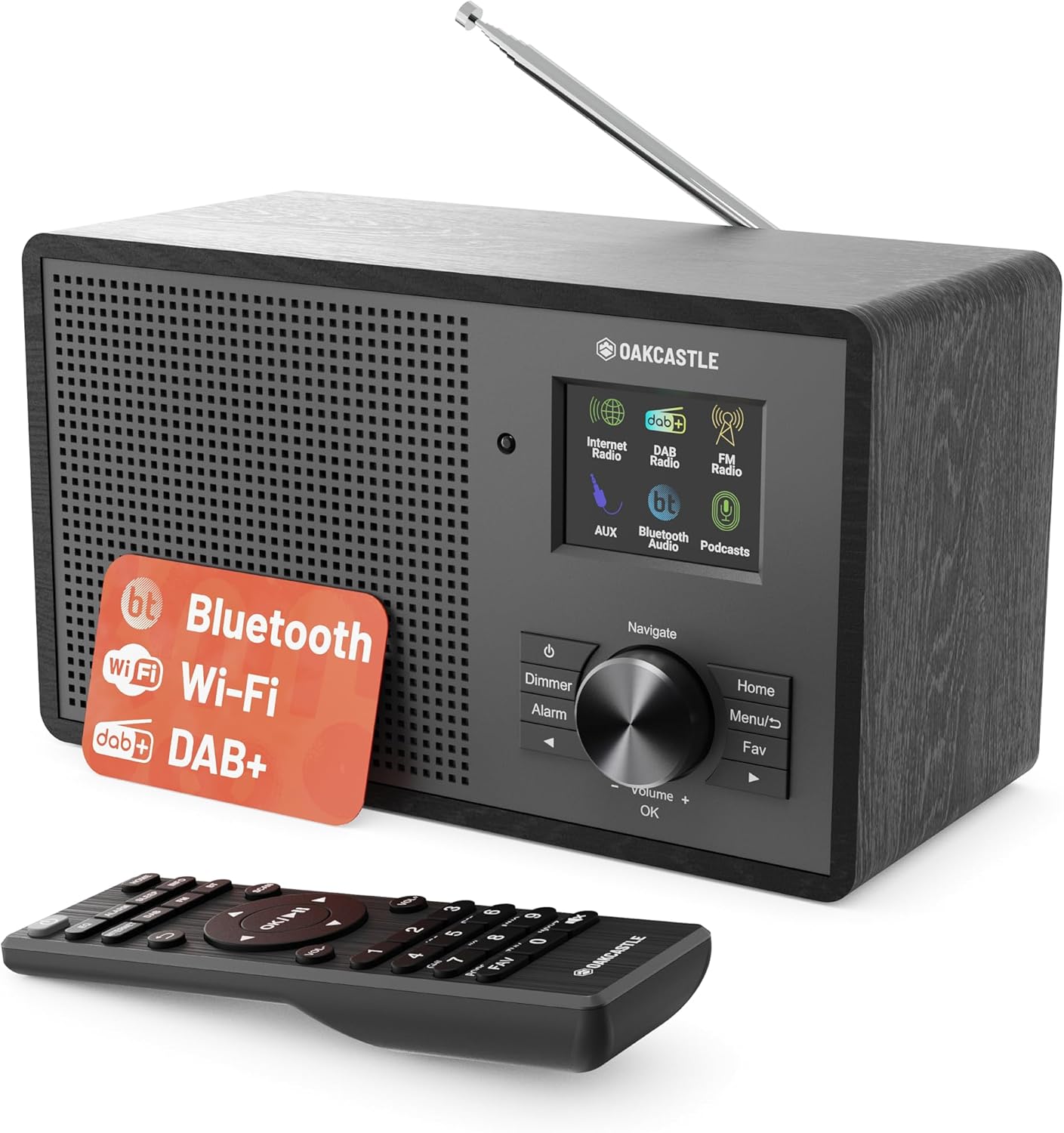
Изображение 3.1: Предна част view of the Oakcastle IR200 radio, showcasing the display, control knob, buttons, and the included remote control.
3.1 Контроли на предния панел
- Екран на дисплея: Показва информация за станцията, време и опции от менюто.
- Navigate/Volume/OK Knob: Rotate to navigate menus or adjust volume; press to confirm selections.
- Бутон за захранване: Включва/изключва устройството или го поставя в режим на готовност.
- Бутон за димер: Регулира яркостта на дисплея.
- Бутон за аларма: Достъп до настройките на алармата.
- Бутон за начало: Връща се в главното меню.
- Бутон за меню: Accesses mode-specific menus.
- Бутон „Любими“: Accesses favorite station presets.
3.2 Връзки на задния панел

Изображение 3.2: Задна част view of the Oakcastle IR200, highlighting the headphone output and AUX input ports.
- Телескопична антена: For DAB+ and FM reception.
- AUX вход: Свържете външни аудио устройства.
- Изход за слушалки: Свържете слушалки за лично слушане.
- DC IN: Свързване на захранващ адаптер.
4. Първоначална настройка
4.1 Захранване
- Insert the power cable into the DC IN port on the rear of the radio.
- Включете другия край на захранващия кабел в контакта на стената.
- Press the Power button on the front panel or remote control to turn on the radio.
4.2 Регулиране на антената
For optimal DAB+ and FM reception, fully extend the telescopic antenna located at the rear of the unit.
4.3 Network Connection (for Internet Radio)
- Upon first power-on, the radio will guide you through the network setup.
- Select "Network Wizard" or "Wi-Fi Setup" from the menu.
- Радиото ще сканира за налични Wi-Fi мрежи. Изберете вашата мрежа от списъка.
- Enter your Wi-Fi password using the navigation knob and OK button.
- След като се свърже, радиото ще покаже съобщение за потвърждение.
5. Режими на работа
The Oakcastle IR200 offers several listening modes. Press the "Home" button to access the main menu and select your desired mode.
5.1 Интернет радио
Access thousands of global radio stations via your Wi-Fi connection.

Image 5.1: The radio's display screen in Internet Radio mode, showing station information.
- От главното меню изберете „Интернет радио“.
- You can browse stations by location, genre, or search by name.
- Rotate the Navigate knob to scroll through options and press OK to select.
- To save a station as a favorite, press the "Fav" button during playback.
5.2 DAB+ радио
Насладете се на висококачествени цифрови радиопредавания.

Image 5.2: The radio's display screen in DAB+ Radio mode, showing the current station.
- From the main menu, select "DAB+ Radio".
- Радиото автоматично ще сканира за налични DAB+ станции.
- Use the Navigate knob to select a station from the list.
- To save a station as a favorite, press the "Fav" button during playback.
5.3 FM радио
Настройте се на традиционните аналогови FM предавания.
- От главното меню изберете „FM радио“.
- To auto-scan for stations, press and hold the OK button or use the scan function via the menu.
- To manually tune, rotate the Navigate knob.
- To save a station as a favorite, press the "Fav" button during playback.
5.4 Bluetooth връзка
Предавайте аудио безжично от вашите устройства с Bluetooth.

Image 5.3: The radio's display screen in Bluetooth mode, indicating readiness for pairing.
- From the main menu, select "Bluetooth". The radio will enter pairing mode.
- On your external device (e.g., smartphone), enable Bluetooth and search for "Oakcastle IR200".
- Select "Oakcastle IR200" to pair. Once connected, you can stream audio.
5.5 AUX вход
Свържете външни аудио източници, като използвате 3.5 мм аудио кабел.
- Connect one end of a 3.5mm audio cable to the AUX IN port on the rear of the radio.
- Свържете другия край към жака за слушалки или аудио изхода на вашето външно устройство.
- From the main menu, select "AUX".
- Управлявайте възпроизвеждането от вашето външно устройство.
5.6 Подкасти
Browse and listen to a wide range of podcasts.
- From the main menu, select "Podcasts".
- Browse podcasts by category or search for specific titles.
- Select a podcast to start listening.
6. Настройки и функции
6.1 Системни настройки
Access general system settings via the main menu to configure time, language, display, and more.
- Час/Дата: Set time format, synchronize time.
- език: Select your preferred language for the menu.
- Дисплей: Adjust backlight, color scheme.
- мрежа: Reconfigure Wi-Fi settings.
- Актуализация на софтуера: Check for and install firmware updates.
6.2 Еквалайзер (EQ)
Customize the audio output to your preference using the equalizer settings, accessible via the remote control or system menu.
6.3 предварителни настройки
The radio supports over 90 presets for your favorite Internet, DAB+, and FM stations. To recall a preset, press the "Fav" button and select from the list.
6.4 Аларми
Set alarms to wake up to your favorite radio station or a buzzer sound. Access alarm settings via the "Alarm" button on the front panel or remote.
7. Дистанционно управление
The included remote control provides convenient access to all radio functions from a distance.
Ensure batteries are correctly inserted. Point the remote control towards the front of the radio for optimal response.
7.1 Функции за дистанционно управление
- мощност: On/Off/Standby.
- Сила на звука +/-: Регулирайте нивото на силата на звука.
- Бутони за навигация (нагоре/надолу/наляво/надясно): Навигиране в менютата.
- OK: Потвърдете избора.
- Mode Buttons (Internet, DAB, FM, Bluetooth, AUX): Превключване между режимите.
- Бутони за предварително зададени настройки (1-90+): Directly select saved favorite stations.
- EQ: Достъп до настройките на еквалайзера.
- Меню: Access mode-specific menus.
- Любими: Access favorite station list.
8. Поддръжка
8.1 Почистване
To clean the radio, use a soft, dry cloth. Do not use abrasive cleaners, waxes, or solvents as these may damage the finish.
8.2 Общи грижи
- Пазете устройството от пряка слънчева светлина, източници на топлина и влага.
- Избягвайте изпускането на устройството или подлагането му на силни удари.
- Осигурете подходяща вентилация около уреда.
9. Отстраняване на проблеми
| проблем | Възможна причина | Решение |
|---|---|---|
| Без захранване | Power cable not connected; wall socket not active. | Check power cable connection; try a different wall socket. |
| Без звук | Силата на звука е твърде ниска; активиран е звукът; избран е неправилен източник. | Increase volume; Check mute status; Select correct input mode. |
| Интернет радиото не се свързва | Incorrect Wi-Fi password; Weak Wi-Fi signal; Router issue. | Re-enter Wi-Fi password; Move radio closer to router; Restart router. |
| Слаб DAB+/FM прием | Antenna not extended; Poor signal area. | Fully extend antenna; Reposition radio for better signal. |
| Bluetooth не се сдвоява | Radio not in pairing mode; Device too far; Device already paired. | Ensure radio is in Bluetooth mode; Move device closer; Unpair from other devices. |
10. Спецификации
| Характеристика | детайл |
|---|---|
| Марка | Oakcastle |
| Модел | IR200 |
| Цвят | черен |
| Технология за свързване | Wi-Fi, Bluetooth 5.3, AUX |
| Технология за тунинг | Интернет радио, DAB+, FM |
| Специални функции | Bluetooth, EQ, Podcasts, Internet Radio, Remote Control |
| Източник на захранване | Electric Cable (Mains) |
| Размери на продукта (В x Ш x Д) | 14 см x 10.5 см x 23 см (приблизително) |
| Тегло на продукта | 0.94 кг |
| Съвместими устройства | MP3 плейър, смартфон, таблет |
11. Гаранция и поддръжка
11.1 Гаранционна информация
The Oakcastle IR200 comes with a standard warranty. An extended 3-year warranty is available upon product registration on the manufacturer's website. Please refer to the warranty card included in your package or visit the official Oakcastle webсайт за подробности.
11.2 Поддръжка на клиенти
For technical assistance, troubleshooting, or further inquiries, please contact Oakcastle customer support. Contact details can typically be found on the official Oakcastle webсайта или на гаранционната карта.


