1. Важни инструкции за безопасност
Моля, прочетете внимателно всички инструкции, преди да използвате този уред, и ги запазете за бъдещи справки. Неспазването на тези инструкции може да доведе до токов удар, пожар или сериозни наранявания.
- Уверете се, че захранването обtage съответства на етикета с характеристики на уреда.
- Не използвайте вентилатора с повреден кабел или щепсел. Ако кабелът е повреден, той трябва да бъде подменен от производителя, негов сервизен агент или лица с подобна квалификация, за да се избегне опасност.
- Винаги изключвайте вентилатора от контакта, преди да го почиствате, обслужвате или местите.
- Не пъхайте пръсти или каквито и да било предмети в решетката на вентилатора, докато той работи.
- Пазете вентилатора далеч от вода или други течности. Не го използвайте във влажна илиamp среди.
- Този уред е само за вътрешна употреба. Не използвайте на открито.
- Do not place the fan near heat sources such as radiators, heat registers, stoves, or other appliances that produce heat.
- Наблюдавайте децата, за да сте сигурни, че не си играят с уреда.
- Do not use the fan in areas where gasoline, paint, or flammable liquids are stored.
2. Продуктът свършиview
The Altus AL 40 TFB is a sleek and efficient tower air cooler designed for indoor use. It features a compact design, multiple speed settings, and easy-to-use push-button controls.
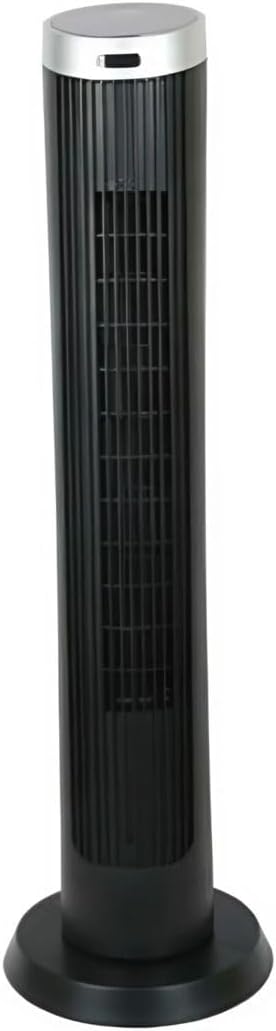
Фигура 2.1: Отпред view of the Altus AL 40 TFB Tower Air Cooler. This image shows the tall, slender black body of the fan with its air outlet grille and a stable round base.
Компоненти:
- Контролен панел: Located on the top of the unit for easy access to all functions.
- Решетка за изпускане на въздух: Vertical grille on the front for air dispersion.
- Основа: Stable round base for secure placement.
- Захранващ кабел: Намира се в задната част на устройството.

Фигура 2.2: Подробно view of the control panel on top of the Altus AL 40 TFB Tower Air Cooler. The panel features a digital display showing '28' and several push buttons for various functions.
3. Настройка
Follow these steps to set up your Altus AL 40 TFB Tower Air Cooler:
- Разопаковайте: Carefully remove the fan from its packaging. Retain the packaging for future storage or transport.
- Сглобяване на основата (ако е необходимо): Some models may require minor base assembly. If your unit's base is detached, align the base sections and secure them according to the diagrams in the packaging. Ensure it is firmly attached.
- Разположение: Place the fan on a firm, level surface. Ensure there is adequate space around the fan for proper airflow, at least 30 cm (12 inches) from walls or furniture. This appliance is designed for indoor use only.
- Захранване: Plug the power cord into a standard electrical outlet. Ensure the outlet meets the voltagИзискванията, посочени на етикета на продукта.
4. Инструкции за работа
Your Altus AL 40 TFB Tower Air Cooler is equipped with user-friendly push-button controls on the top panel.
Функции на контролния панел:
- Бутон за включване (⏻): Press once to turn the fan ON, press again to turn it OFF.
- Бутон за скорост (💨): Press repeatedly to cycle through the 3 available fan speeds: Low, Medium, and High. The current speed setting may be indicated on the digital display.
- Бутон за режим (M): If available, press to select different operating modes (e.g., Normal, Natural, Sleep). Refer to the digital display for the active mode.
- Бутон за осцилация (↔): Press to activate or deactivate the oscillation function, which allows the fan to rotate from side to side to distribute air over a wider area.
- Бутон за таймер (🕒): If available, press to set an automatic shut-off timer. Each press typically increases the timer duration by a set increment (e.g., 1 hour).
Обща операция:
- Включете вентилатора в подходящ контакт.
- Натиснете бутона за захранване (⏻) to turn on the fan.
- Select your desired fan speed using the Speed Button (💨).
- Activate oscillation if desired by pressing the Oscillation Button (↔).
- To turn off the fan, press the Power Button (⏻) отново.
5. Поддръжка
Regular maintenance ensures optimal performance and extends the lifespan of your Altus AL 40 TFB Tower Air Cooler.
Почистване:
- Винаги изключвайте вентилатора от контакта преди почистване.
- Външно почистване: Избършете външните повърхности на вентилатора с мека,amp кърпа. Не използвайте абразивни почистващи препарати, восъци или полиращи препарати, тъй като те могат да повредят покритието.
- Решетки за вход/изход на въздух: Use a vacuum cleaner with a brush attachment to gently remove dust and debris from the air inlet and outlet grilles. Do not attempt to disassemble the fan for cleaning.
- Уверете се, че вентилаторът е напълно сух, преди да го включите отново и да го използвате.
Съхранение:
When not in use for extended periods, store the fan in a cool, dry place. It is recommended to store it in its original packaging to protect it from dust and damage.
6. Отстраняване на проблеми
If you encounter any issues with your Altus AL 40 TFB Tower Air Cooler, please refer to the following common problems and solutions:
- Вентилаторът не се включва:
- Проверете дали захранващият кабел е добре включен в работещ електрически контакт.
- Ensure the power button on the control panel has been pressed.
- Verify that the household circuit breaker or fuse has not tripped.
- Слаб въздушен поток:
- Check if the fan speed is set to a higher setting.
- Ensure the air inlet and outlet grilles are not blocked by dust or obstructions. Clean them if necessary.
- Необичаен шум:
- Уверете се, че вентилаторът е поставен върху стабилна, равна повърхност.
- Check for any foreign objects that might have fallen into the fan grilles.
- Ако шумът продължава, прекратете употребата и се свържете с отдела за обслужване на клиенти.
If the problem cannot be resolved using the above steps, please contact Altus customer support.
7. Спецификации
Detailed technical specifications for the Altus AL 40 TFB Tower Air Cooler:
| Характеристика | Спецификация |
|---|---|
| Марка | Алтус |
| Име на модела | AL 40 TFB |
| Цвят | черен |
| Дизайн на електрически вентилатор | Floor Fan (Tower Type) |
| Източник на захранване | Електрически с кабел |
| Размери на продукта (Д x Ш x В) | 29 Д x 29 Ш x 101 В см |
| Тип монтаж | Етаж |
| Тип покритие | Боядисани |
| Използване на закрито/външно | На закрито |
| Контролен метод | Бутон |
| Брой нива на мощност | 3 |
| Безжичен | не |
8. Гаранция и поддръжка
Altus provides comprehensive support for its products. For any assistance or warranty-related inquiries, please contact our customer service.

Фигура 8.1: Altus customer service and warranty information. The image displays the Altus logo, a message about service availability, and a contact number for support.
Our services are always available for your Altus products. You can benefit from our door-to-door service by calling our support line for any assistance you may need.
Arçelik Service Warranty: For products under warranty, our home product pickup service is provided free of charge.
Customer Support Line: 0850 210 0 888
Please have your product model number (AL 40 TFB) and purchase details ready when contacting support.


