1. Въведение
Благодаря за покупкатаasing the LG 43-Inch Class QNED AI 4K Smart TV. This manual provides essential information for the safe and efficient operation of your television. Please read it thoroughly before use and keep it for future reference.
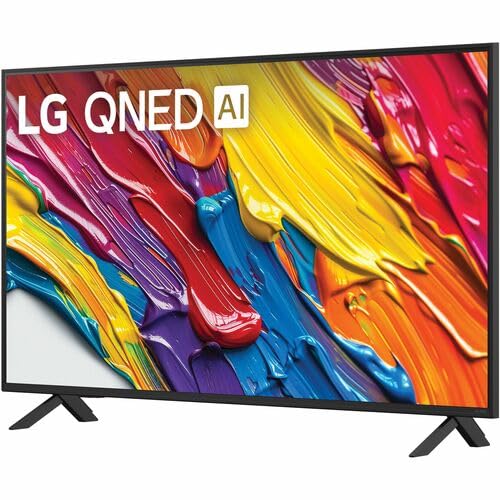
The LG QNED AI 4K TV offers vivid, immersive color with its wide color gamut technology, enhanced by the α7 AI Processor Gen8. It intelligently optimizes picture and sound based on content. Powered by LG webOS 24, it provides a streamlined streaming experience with customizable Quick Cards and the Magic Remote. Enjoy virtual 5.1 surround sound, FILMMAKER MODE, and advanced gaming features like FreeSync, VRR, and GeForce NOW.
2. Информация за безопасност
Винаги спазвайте основните предпазни мерки, когато използвате този продукт, за да намалите риска от пожар, токов удар или нараняване.
- Не излагайте телевизора на дъжд или влага.
- Не отваряйте телевизора casinж; поверете цялото обслужване на квалифициран персонал.
- Осигурете правилна вентилация и не блокирайте вентилационните отвори.
- Използвайте само захранващия кабел, доставен с телевизора.
- Дръжте телевизора далеч от източници на топлина и пряка слънчева светлина.
- Avoid placing heavy objects on the power cord or TV.
3. Какво има в кутията
Проверете дали всички компоненти са налични:
- LG 43-Inch Class QNED AI 4K Smart TV
- Захранващ кабел
- Дистанционно управление (включени 2 батерии AAA)
- Компоненти на стойката
- Ръководство на потребителя (този документ)
4. Настройка
4.1 Прикрепване на стойката
Внимателно поставете телевизора с екрана надолу върху мека, равна повърхност. Прикрепете компонентите на стойката към обозначените слотове в долната част на телевизора, като използвате предоставените винтове. Уверете се, че стойката е здраво закрепена, преди да поставите телевизора изправен.
Изображение: Задна част view of the LG 43QNED82AUA TV with its stand.
4.2 Монтаж на стена (по избор)
This TV supports VESA mount standard 200 x 200 mm. For wall mounting, remove the stand and use a compatible wall mount bracket (sold separately). Follow the instructions provided with your wall mount.
4.3 Свързване на устройства
Connect your external devices (cable box, Blu-ray player, gaming console, etc.) to the appropriate ports on the TV. The TV features 3 HDMI ports, 1 USB port, Ethernet, and S/PDIF (Optical) for audio output.

Image: Connectivity ports on the back of the LG 43QNED82AUA TV.
4.4 Включване
Plug the power cable into the TV and then into a wall outlet. Press the power button on the remote control or on the TV to turn it on. Follow the on-screen instructions for initial setup, including network connection and channel scanning.
5. Работа с вашия телевизор
5.1 Дистанционно управление
The included Magic Remote allows for intuitive control with point-and-click functionality, voice commands, and a scroll wheel. Insert the two AAA batteries (included) into the remote control.
5.2 WebOS 24 Интелигентна платформа
Your TV runs on LG's webOS 24 operating system. Navigate through apps, settings, and inputs using the customizable Quick Cards. Access popular streaming services like Netflix, Prime Video, Disney Plus, HBO Max, and Apple TV directly from the home screen.
5.3 Настройки на картината и звука
Access the settings menu to adjust picture modes (e.g., Standard, Vivid, Cinema, Filmmaker Mode) and sound modes (e.g., AI Sound Pro, Standard, Cinema). The α7 AI Processor Gen8 automatically optimizes these settings based on the content being viewизд.

Image: Dynamic QNED Color representation.
6. Smart Features and AI
6.1 AI Picture and Sound
The α7 AI Processor Gen8 enhances brightness, improves sound, and refines picture detail with 4K upscaling and Dynamic Tone Mapping. AI Sound Pro provides virtual 5.1 surround sound, and WOW Orchestra integrates TV speakers with compatible LG soundbars for an enhanced audio experience.
6.2 Voice Assistance and AI Search
Your TV has Alexa Built-in. Press the Alexa button on your remote to activate voice commands. Utilize AI Търсене на personalized recommendations and to find content quickly. The TV also supports Google Assistant, Apple AirPlay 2, and Google Cast for seamless integration with your smart home ecosystem.

Image: LG AI Search interface.
7. Функции за игри
The LG QNED AI 4K TV is designed for an optimal gaming experience with a 60 Hz native refresh rate, which can be boosted up to 144 Hz with VRR (Variable Refresh Rate) enabled. It supports FreeSync and features LG Game Optimizer and Game Dashboard for quick access to gaming settings.
- FreeSync & VRR: Намалява разкъсването и заекването на екрана за по-плавен геймплей.
- Оптимизатор на игри и табло за управление: Centralized hub for adjusting game settings, including genre-specific picture modes.
- Облачни игри: Access GeForce NOW and Xbox Cloud Gaming (subscriptions and compatible controllers required).
- ALLM (Автоматичен режим на ниска латентност): Автоматично превключва в режим с ниска латентност, когато бъде открита игрова конзола.

Image: Gaming experience on the LG 43QNED82AUA TV.
8. Свързаност
Your LG QNED AI 4K Smart TV offers a variety of connectivity options:
- HDMI: 3 ports for connecting external devices.
- USB: 1 port for media playback or connecting USB devices.
- Ethernet: За кабелна интернет връзка.
- Wi-Fi: Вграден за безжичен интернет достъп.
- Bluetooth 5.0: За свързване на безжични слушалки, саундбари или други Bluetooth устройства.
- Оптичен (S/PDIF): За цифров аудио изход към озвучителни системи.
- Дублиране на екрана: Supports AirPlay 2 and Google Cast for casting content from mobile devices.
9. Поддръжка
9.1 Почистване на телевизора
Unplug the TV before cleaning. Use a soft, dry cloth to wipe the screen and exterior. For stubborn marks, lightly dampИзбършете кърпата с вода или специализиран препарат за почистване на екрани. Избягвайте използването на агресивни химикали или абразивни материали.
9.2 Софтуерни актуализации
Ensure your TV's software is up to date for optimal performance and new features. Software updates auto-download when connected to the internet. If "auto-update" is disabled, you will receive a prompt to update manually.
10. Отстраняване на проблеми
Ако срещнете проблеми с телевизора си, вижте следните често срещани решения:
| проблем | Решение |
|---|---|
| Без захранване | Check power cable connection, wall outlet, and remote batteries. |
| Няма картина, но има звук | Verify input source, check cable connections, try a different HDMI port. |
| Няма звук, но има картина | Check volume, mute status, audio output settings, and external audio device connections. |
| Дистанционното не работи | Replace batteries, ensure no obstructions between remote and TV, re-pair Magic Remote if necessary. |
| Лошо качество на картината | Adjust picture settings, check source resolution, ensure strong signal for broadcast channels. |
| Не може да се свърже с Wi-Fi | Restart router, check Wi-Fi password, ensure TV is within range, try wired Ethernet connection. |
For further assistance, please refer to the full electronic manual available on the LG support webсайта или се свържете с отдела за обслужване на клиенти на LG.
11. Спецификации
| Характеристика | детайл |
|---|---|
| Размер на екрана | 43 инча |
| Технология на дисплея | LED (QNED) |
| Резолюция | 4K (3840 x 2160) |
| Честота на опресняване | 60 Hz (Native), up to 144 Hz (VRR) |
| Процесор | a7 AI процесор Gen8 |
| Поддръжка на HDR | HDR10, HLG |
| Операционна система | webOS 24 |
| Свързаност | Wi-Fi, Bluetooth 5.0, Ethernet, 3x HDMI, 1x USB, Optical (S/PDIF) |
| Гласови асистенти | Вградена Alexa, съвместима с Google Assistant |
| Размери (със стойката) | 10.1" Д x 38.1" Ш x 25" В |
| Тегло (без стойка) | 20.7 паунда |
| Стандарт за монтиране VESA | 200 х 200 мм |
| Консумирана мощност | 82 вата |
| Годишна консумация на енергия | 152 киловатчаса на година |

Image: LG 43QNED82AUA TV dimensions.
12. Гаранция и поддръжка
12.1 Гаранционна информация
This LG TV comes with a 1 Year Parts & Labor Limited Warranty. Please retain your proof of purchase for warranty claims. For full warranty terms and conditions, refer to the warranty card included with your product or visit the official LG webсайт.
12.2 Поддръжка на клиенти
For technical support, product registration, or service inquiries, please visit the LG support website or contact their customer service hotline. Contact information can be found on the LG official webсайта или в документацията, предоставена с вашия телевизор.