1. Въведение
This manual provides essential information for the VIMIN 10-Port 10G/2.5G Unmanaged Ethernet Switch. This device is designed to expand your network capacity with high-speed connectivity, featuring 8x 2.5 Gigabit Ethernet ports and 2x 10 Gigabit Ethernet ports. It offers a non-blocking 80Gbps switching capacity, ensuring efficient data transfer for demanding applications like 4K streaming, gaming, and NAS connections. The switch operates on a plug-and-play principle, requiring no complex configuration for immediate use.
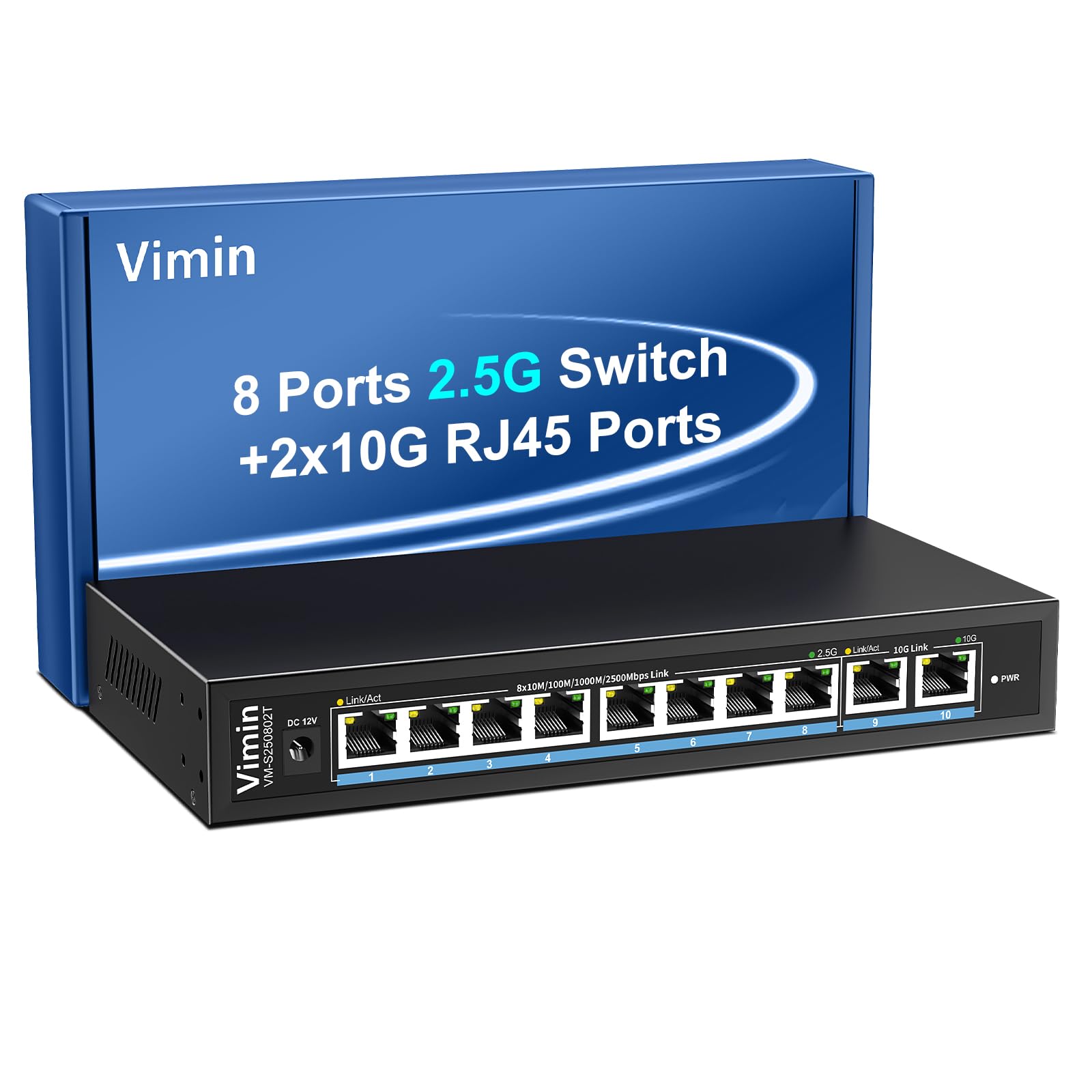
Figure 1: VIMIN 10-Port 2.5Gb Unmanaged Ethernet Switch in a typical setup.
2. Съдържание на пакета
Please verify that all items are present and in good condition upon opening the package. If any items are missing or damaged, please contact customer support.
- 1x VIMIN 10-Port 2.5G Unmanaged Ethernet Switch
- 1x ръководство за потребителя
- 1x захранващ кабел

Figure 2: Package contents of the VIMIN 10-Port 2.5G Ethernet Switch.
3. Продуктът свършиview
3.1 Преден панел
The front panel of the switch features ten RJ45 Ethernet ports and LED indicators for status monitoring.
- Портове 1-8: 2.5 Gigabit Ethernet ports (10/100/1000/2500Mbps auto-negotiation).
- Портове 9-10: 10 Gigabit Ethernet ports (10/100/1000/2500/5000/10000Mbps auto-negotiation).
- Link/Act LED (Yellow/Green): Indicates link status and data activity.
- 2.5G Link LED (Green, for ports 1-8): Indicates a 2.5Gbps connection.
- 10G Link LED (Green, for ports 9-10): Indicates a 10Gbps connection.
- PWR светодиод: Показва статус на захранване.

Figure 3: Front and rear panel of the VIMIN 10-Port 2.5G Ethernet Switch.

Фигура 4: Подробно view of the RJ45 ports and LED indicators.
3.2 Заден панел
The rear panel includes the DC 12V 1A power input port.
4. Настройка
The VIMIN 10-Port Ethernet Switch is designed for simple plug-and-play operation, requiring no software configuration.
4.1 Захранване
- Connect the provided power adapter to the DC 12V 1A power input port on the rear panel of the switch.
- Plug the power adapter into a standard electrical outlet. The PWR LED on the front panel will illuminate, indicating the switch is powered on.
4.2 Свързване на устройството
- Connect your network devices (e.g., NAS, PC, Wireless AP, WiFi 7 Routers, 10G Adapter/NIC, Gaming PC, 4K/8K Video devices) to any of the RJ45 ports (1-10) using appropriate Ethernet cables.
- The switch automatically detects the speed and duplex mode of the connected device. The Link/Act LED for the respective port will light up when a valid connection is established and flash during data transmission.

Figure 5: Plug and Play connectivity with various network devices.

Фигура 6: Прample applications for the 10-Port 2.5G Ethernet Switch.
4.3 Cable Type Recommendations
For optimal performance, especially for 2.5G and 10G connections, use appropriate Ethernet cable types:
| Тип кабел | 10M | 100M | 1G | 2.5G | 5G | 10G |
|---|---|---|---|---|---|---|
| КАТ 3/4 | ✓ | ✗ | ✗ | ✗ | ✗ | ✗ |
| КОТКА 5 | ✓ | ✓ | ✗ | ✗ | ✗ | ✗ |
| CAT 5e | ✓ | ✓ | ✓ | ✗ | ✗ | ✗ |
| КОТКА 6 | ✓ | ✓ | ✓ | ✓ | ✓ | (<55m) |
| CAT 6A/7 | ✓ | ✓ | ✓ | ✓ | ✓ | ✓ |
Figure 7: Ethernet cable type compatibility and performance.
4.4 Опции за монтаж
The compact design of the switch allows for both desktop placement and wall mounting to save space.

Figure 8: Desktop and wall-mount installation options.
5. Инструкции за работа
The VIMIN 10-Port Unmanaged Ethernet Switch operates automatically once connected, requiring no user intervention for basic network functions.
5.1 Автоматично договаряне
Each port on the switch supports auto-negotiation, automatically adjusting the transmission method and speed (10/100/1000/2500Mbps for ports 1-8, and up to 10Gbps for ports 9-10) to match the connected device. This ensures optimal performance without manual configuration.

Figure 9: Self-Negotiation Functionality.
5.2 Контрол на потока
The switch supports IEEE 802.3x flow control for full-duplex mode and backpressure for half-duplex mode. These mechanisms prevent data packet loss during periods of high network traffic by temporarily pausing data transmission from congested devices, ensuring stable and reliable connections.
6. Поддръжка
To ensure the longevity and optimal performance of your VIMIN Ethernet Switch, follow these maintenance guidelines:
- Почистване: Използвайте мека, суха кърпа, за да почистите външната част на превключвателя. Не използвайте течни или аерозолни почистващи препарати.
- Вентилация: Ensure proper airflow around the switch. Do not block ventilation openings. The fanless design relies on natural convection for cooling.
- Околна среда: Place the switch in a cool, dry location away from direct sunlight, heat sources, and excessive moisture.
- мощност: Използвайте само предоставения захранващ адаптер. Изключвайте захранването по време на гръмотевични бури или когато не се използва за продължителни периоди.
7. Отстраняване на проблеми
If you encounter issues with your VIMIN Ethernet Switch, refer to the following common troubleshooting steps:
- Без захранване:
- Уверете се, че захранващият адаптер е здраво свързан както към комутатора, така и към работещ електрически контакт.
- Проверете дали електрическият контакт работи, като включите друго устройство.
- Check if the PWR LED on the switch is illuminated.
- Няма връзка/активност на порт:
- Проверете дали Ethernet кабелът е здраво свързан както към порта на комутатора, така и към свързаното устройство.
- Уверете се, че свързаното устройство е включено и функционира правилно.
- Try a different Ethernet cable to rule out cable failure.
- Тествайте с различен порт на комутатора.
- Бавна скорост на мрежата:
- Ensure you are using appropriate cable types (e.g., CAT6 or CAT6A/7 for 2.5G/10G connections) as indicated in Section 4.3.
- Check the network adapter settings on your connected device to ensure it supports the desired speed.
- Verify that the Link/Act LED indicates the expected speed (e.g., green for 2.5G/10G).
- Reduce network congestion by limiting simultaneous high-bandwidth activities.
- Прекъсната връзка:
- Проверете за разхлабени кабелни връзки.
- Ensure the switch is placed in a stable environment, free from excessive vibrations or temperature fluctuations.
- Consider potential electromagnetic interference from other electronic devices.
8. Спецификации
| Характеристика | Описание |
|---|---|
| Марка | ВИМИН |
| Номер на модела | 8x2.5G Ethernet (Unmanaged) |
| Брой портове | 10 (8x 2.5G RJ45, 2x 10G RJ45) |
| Тип интерфейс | RJ45 |
| Скорост на трансфер на данни | 10 гигабита в секунда (макс.) |
| Превключващ капацитет | 80Gbps |
| Контрол на потока | IEEE 802.3x (Full-Duplex), Backpressure (Half-Duplex) |
| Стандарти | IEEE 802.3bz, IEEE 802.3u, IEEE 802.3ab, IEEE 802.3z |
| Входяща мощност | DC 12V 1A (AC 100-240V adapter) |
| Тегло на артикула | 1.83 паунда (приблизително 0.83 кг) |
| Размери на опаковката | 9.53 x 6.5 x 2.99 инча (приблизително 24.2 x 16.5 x 7.6 см) |
| Цвят | черен |
| Съвместими устройства | Desktop, Gaming Console, Laptop, NAS, Wireless AP |
9. Гаранция и поддръжка
VIMIN products are designed for reliability and performance. For warranty information, technical support, or any product-related inquiries, please refer to the warranty card included with your product or visit the official VIMIN website. You may also contact VIMIN customer service through the retailer where the product was purchased.
За допълнителна помощ, моля, посетете VIMIN Store on Amazon.


