1. Продуктът свършиview
The GMKtec NucBox K8 Plus is a high-performance mini PC designed for gaming, business, and creative tasks. It features the latest AMD Ryzen 7 8845HS processor, advanced graphics capabilities, and extensive connectivity options in a compact form factor.
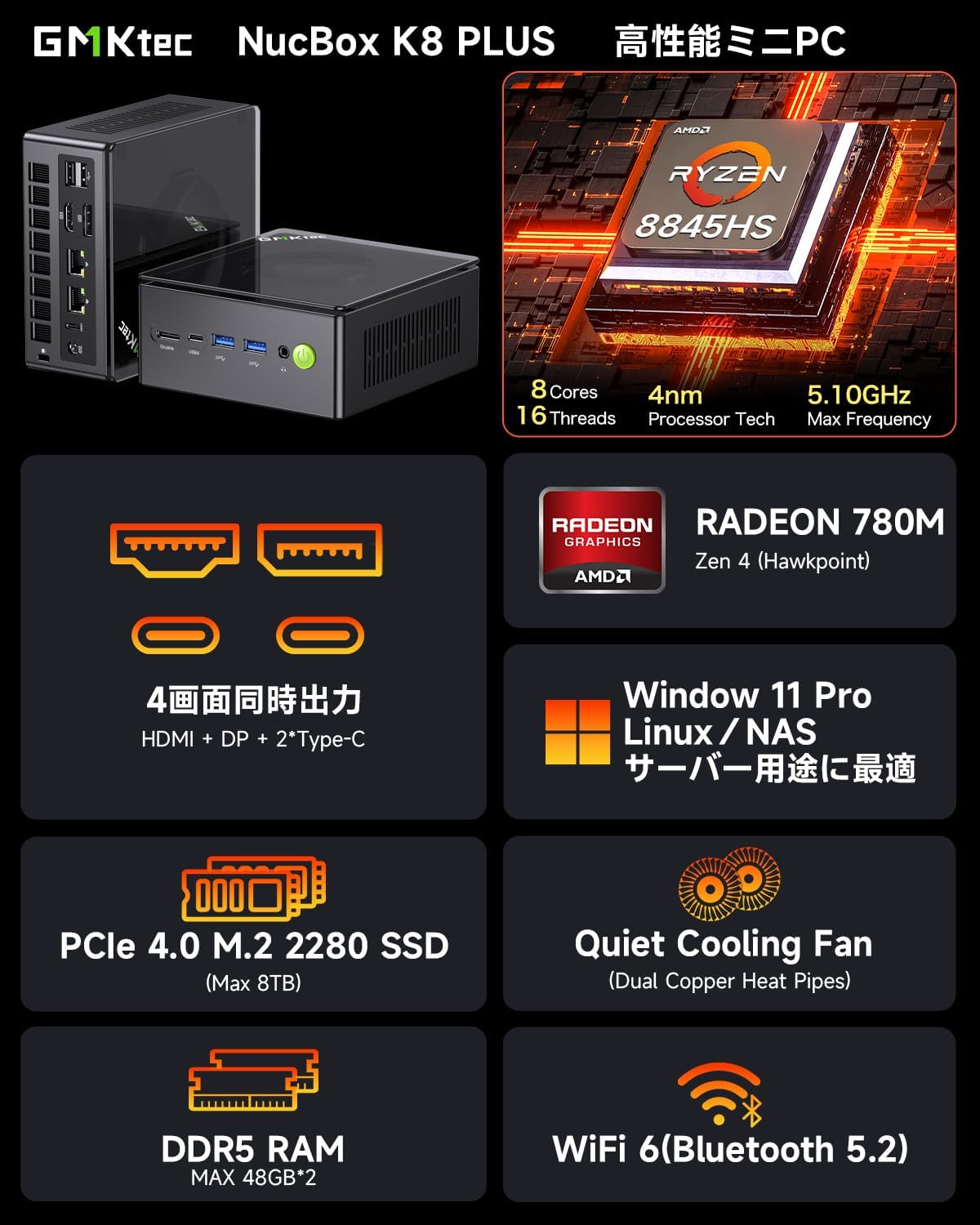
Image: GMKtec NucBox K8 Plus Mini PC highlighting its core features and specifications.
Ключови характеристики:
- Процесор: AMD Ryzen 7 8845HS (8 Cores, 16 Threads, Max 5.1GHz) with integrated AMD Ryzen AI Engine (NPU).
- Графика: AMD Radeon 780M GPU (RDNA3 architecture), comparable to GTX 1650 Ti.
- Памет: Supports up to 128GB DDR5 (5600MHz, 64GBx2) (barebone model requires separate purchase).
- Съхранение: Supports up to 8TB PCIe 4.0 x4 M.2 SSD (barebone model requires separate purchase).
- Изход на дисплея: Simultaneous 4-screen output with 8K@60Hz support via 2x USB4, 1x HDMI 2.1, and 1x DisplayPort 2.1.
- Свързване: Dual 2.5Gbps LAN, Wi-Fi 6 AX200 (2.4Gbps), Bluetooth 5.2.
- Портове: 2x Type-C (USB4/PD), 1x HDMI, 1x DP, 2x USB 3.2, 2x USB 2.0, 1x 3.5mm CTIA, 1x DC jack.
- Охлаждане: Dual-fan cooling system with VC heat plate for stable performance.
2. Настройка и инсталация
Important Note for Barebone Models:
This NucBox K8 Plus model is a barebone unit. It does not come with pre-installed DDR memory or an SSD. You must purchase and install these components separately for the PC to function correctly and display the operating system. Failure to install them will result in the system not booting or displaying a blue screen.
Memory (DDR) and SSD Installation:
Follow these steps to install your DDR memory and SSD. It is recommended to install and verify each memory module individually if installing two.
- Open the Mini PC cover to access the motherboard.
- For DDR memory, insert the SO-DIMM module(s) at an angle into the slot(s) and gently push down until it clicks into place.
- For SSD, insert the M.2 SSD card into its slot and secure it with the provided screw.
- If installing two memory modules, insert one first. Power on the PC and wait approximately 1 minute for the system to recognize it. After recognition, power off, then insert the second module and restart.
Video: Demonstrates the installation process for DDR memory and M.2 SSD, including how to check recognition in BIOS.
Свързване на периферни устройства:
Connect your monitor, keyboard, and mouse. For initial setup, it is recommended to use a wired mouse or a USB receiver-based wireless mouse, as Bluetooth mice may not be recognized during the initial Windows setup screen.

Изображение: Подробно view of the Mini PC's front and rear ports for connecting peripherals.
3. Инструкции за работа
Powering On and Initial Boot:
After installing memory and SSD, connect the power adapter and a monitor. The PC will automatically enter the BIOS screen upon first boot. Here you can verify memory and SSD information.
Video: Shows the BIOS screen after initial boot, confirming memory and SSD detection.
Конфигурация на дисплея:
The NucBox K8 Plus supports up to four simultaneous displays, offering flexibility for various setups including gaming, video editing, and multi-tasking. Connect your monitors to the available HDMI, DisplayPort, and USB4 (Type-C) ports.

Изображение: Прample of a 4-screen setup for gaming and productivity.
Мрежова свързаност:
Utilize the dual 2.5Gbps LAN ports for high-speed wired network connections, or connect wirelessly using the integrated Wi-Fi 6 (AX200) and Bluetooth 5.2 for peripherals.

Image: High-speed network connectivity options.
4. Поддръжка
Accessing Internal Components:
The NucBox K8 Plus is designed for easy access to internal components for upgrades or maintenance. Simply remove the top cover and screws to access the memory, SSD slots, and cooling system.
Video: Shows how to open the Mini PC and access the internal components for maintenance or upgrades.
Охладителна система:
The device features a dual-fan cooling system with a VC heat plate. Regular cleaning of the fans and heatsink is recommended to maintain optimal performance and prevent overheating.

Image: Internal cooling system design.
5. Отстраняване на проблеми
System Not Booting / Blue Screen:
- Ensure that DDR memory and SSD are correctly installed. This is a barebone model and requires these components.
- If installing two memory modules, try installing one at a time and verifying recognition before installing the second.
- If the issue persists, power off the PC, disconnect all external devices, press and hold the power button for 30 seconds, clean the metal terminals of the memory/SSD, then reconnect and restart.
Проблеми с периферното разпознаване:
- For initial setup, use wired keyboards and mice or those with a USB receiver, as Bluetooth devices may not be recognized until the operating system is fully configured.
- Уверете се, че всички кабели са здраво свързани към правилните портове.
6. Спецификации
| Характеристика | детайл |
|---|---|
| Име на марката | GMKtec |
| Име на модела | NucBox K8 Plus (Mini PC AMD 8845HS) |
| Модел на процесора | AMD Ryzen 7 8845HS |
| Скорост на процесора | 5.1 GHz (Max) |
| Графична карта | Интегрирана видеокарта AMD Radeon 780M |
| Поддръжка на паметта | Up to 128GB DDR5 (5600MHz) |
| Поддръжка за съхранение | Up to 8TB PCIe 4.0 x4 M.2 SSD |
| Операционна система | Windows 11 Pro (Compatible) |
| Изход на дисплея | 2x USB4 (40Gbps), 1x HDMI 2.1 (8K@60Hz), 1x DisplayPort 2.1 (8K@60Hz) - Supports 4 simultaneous screens |
| Мрежова свързаност | Dual 2.5Gbps LAN, Wi-Fi 6 AX200 (2.4Gbps), Bluetooth 5.2 |
| Портове | 2x Type-C (USB4/PD), 1x HDMI, 1x DP, 2x USB 3.2, 2x USB 2.0, 1x 3.5mm CTIA, 1x DC jack |
| Размери на продукта | 13.2 х 12.5 х 5.8 см |
| Тегло | 1.62 кг |
| Включени аксесоари | Вграден микрофон |
| Typical Power Consumption (Balance Mode) | Idle: 13-15W, Web Browsing: 19-29W, YouTube FHD: 21-23W, YouTube 4K: 23-29W, Gaming (MHW: Iceborne): 82-85W, Cinebench R23 Multi-core (10min): 77-79W |
| Typical Power Consumption (Performance Mode) | Cinebench R23 Multi-core (10min): 92-96W |
Note: Power consumption figures are approximate and may vary based on usage and configuration.
Video: Demonstrates power consumption under various loads and modes using a watt checker.
7. Гаранция и поддръжка
GMKtec offers a 1-year manufacturer's warranty for this product. In case of any product defects, please contact the customer support center. The warranty period can be extended by 90 days upon request.
За допълнителна помощ, моля, посетете Магазин GMKtec в Amazon.


